Cafés in the UK are more than places to grab a coffee—they’re vibrant community hubs that marry culinary artistry with social connection. Yet behind every perfectly pulled espresso and freshly baked croissant lies a web of operational challenges, from managing café inventory to ensuring swift order fulfilment during peak hours. Rising overheads, shifting customer expectations for mobile and touchless service, and the need for data-driven insights make manual processes increasingly untenable. This is where café management software—also known as EPOS systems for cafés or hospitality management software—steps in as a game-changer.
A modern POS system for cafés unifies point-of-sale transactions, kitchen workflows, stock control, and marketing automation within a single, cloud-based platform. Whether you operate a cosy independent coffee shop in Edinburgh or a multi-location café concept in Manchester, the right cloud-based café software ensures accuracy, speeds up service, and delivers real-time analytics that drives profitability. From café inventory management and order management to customer relationship management (CRM) for restaurants, these solutions empower you to make informed decisions and focus on what matters most—delighting your customers.
What is a POS in a Café?
A Point of Sale (POS) in a café is the nexus of every transaction and a hub for operational data. Beyond simple cash handling, a modern café POS:
Integrates multiple payment types: keep contactless cards, mobile wallets (Apple Pay, Google Pay), gift vouchers, and loyalty points in one seamless interface. Ensure speed and security at peak times.
Centralises order entry and routing: orders taken at the counter, tableside, or via mobile apps flow automatically to the correct printer or Kitchen Display System (KDS), eliminating manual ticket sorting.
Records granular sales data: drink modifiers (e.g., oat or almond milk), special requests, and transaction timestamps feed into reports that inform staffing rotas and menu tweaks.
Supports compliance: built‑in VAT categorisation, digital receipts, and audit logs make it straightforward to meet HMRC requirements and support financial audits.
In the UK’s café market—where independents and small chains juggle high footfall and tight margins—this convergence of front‑of‑house and back‑of‑house functionality is essential for consistent, high‑quality guest experiences.
How to Choose the Best Café POS System
Selecting the ideal POS isn’t one‑size‑fits‑all. Here’s how to match software capabilities to your café’s ambitions:
Identify Core Needs:
Do you require tableside ordering with handheld tablets? Or will fixed touchscreen terminals suffice?
Is integration with online ordering platforms and delivery partners (e.g., Deliveroo, Just Eat) critical for your business?
Evaluate Software Features:
Order Management: real‑time ticket-splitting, course timing, and kitchen prioritisation.
Inventory Control: auto‑depletion of ingredients, reorder alerts, and recipe costings by SKU.
CRM & Loyalty: customer profiling by spending and visit frequency, plus tiered rewards and automated re‑marketing campaigns.
On-premise solutions can work entirely offline, which is valuable if your location has unreliable connectivity.
Scalability and Multi‑Location Support:
Look for Unified Reporting across outlets, centralised product updates, and consolidated financial dashboards.
Total Cost of Ownership:
Map out one‑off hardware costs, subscription tiers, transaction fees, and support plans. Factor UK‑specific VAT implications on recurring charges. Platforms such as the SkyTab POS for Cafes are appealing due to the £0 upfront cost.
Vendor Ecosystem and Integration:
Ensure compatibility with accounting platforms like Xero or Sage, and ancillary services such as payroll, e-commerce, and accounting.
Local Support and Training:
UK‑based customer service and on‑site installation options can greatly reduce implementation headaches.
A methodical needs analysis, followed by hands‑on demos and peer reviews, ensures you invest in a system that drives growth rather than frustration.
Cloud‑Based Café POS
Cloud POS solutions have revolutionised how UK cafés operate:
Real‑Time Menu and Pricing Updates: Change a latte price or introduce a seasonal special across all terminals instantly, with no manual reprogramming.
Mobile Back‑Office Access: Owners and managers can review live sales, staff performance, and stock alerts from any browser or smartphone, 24/7.
Zero Maintenance Overhead: Software patches, security updates, and new features deploy automatically, reducing IT dependencies.
Enhanced Security and Backups: Data is encrypted and stored in geographically redundant UK data centers, safeguarding against hardware failures.
Flexible Licensing: Scale up with pay‑as‑you‑grow plans—ideal for burgeoning chains or pop‑up concepts.
Where seasonal menus and promotional windows are vital, cloud‑based flexibility becomes a strategic advantage.
User‑Friendly Interface: Quick Ordering
In the rush of a morning coffee run or lunch break, speed and accuracy matter:
Customisable Button Layouts: Group best selling items and modifiers together to reduce taps and eye movement.
Intuitive Search and Item Lookup: Fuzzy search allows baristas to type partial names (e.g., “latte choc”) and instantly locate the correct item.
One‑Touch Order Customisation: Quickly add extras or alter ingredients without navigating deep menus.
Table Management Tools: On‑screen floor plans let staff track open tabs, assign orders to tables, and process payments seamlessly.
Offline Transactions and Sync: Continue selling even if connectivity drops—transactions sync automatically once online.
Training time drops significantly—key in an industry with seasonal hiring—while error rates plummet, boosting customer satisfaction.
Branded Ordering Apps or White‑Label Web Portals: Present your café’s branding, menu, and imagery for a cohesive experience.
Automated Fulfilment Workflows: Orders placed remotely auto‑populate in the POS and KDS, tagged by pick-up time.
Dynamic Pick‑Up Windows: Offer time slots based on real‑time kitchen capacity, smoothing demand peaks.
API Integrations: Sync with third‑party platforms (Uber Eats, Just Eat) to centralise all orders in one dashboard.
Order Status Notifications: Push SMS or in‑app alerts when the customer’s drink is ready, reducing crowding at the counter.
This omnichannel approach boosts revenue by tapping into customers’ desire for quick, contactless transactions.
Customer Insights with Café Analytics
Data without action is wasted. Advanced analytics modules empower you to:
Track Key Performance Indicators (KPIs): Average transaction value, items per sale, peak hour performance, and staff efficiency.
Segment Customer Behaviour: Identify high‑value regulars versus occasional visitors and tailor loyalty rewards accordingly.
Menu Engineering: Conduct basket analysis to discover complementary items (e.g., biscotti with cappuccino) and design promotions.
Lapsed Customer Campaigns: Automatically trigger re‑engagement offers if a patron hasn’t visited in a set timeframe.
ROI Measurement: Attribute sales lift to specific marketing campaigns- email blasts, SMS promos, or social media ads.
By turning data into targeted strategies, UK café owners can drive repeat business and optimise menu profitability.
Café Inventory Management
Tight control over ingredients separates profitable cafés from break‑even operations:
Real‑Time Stock Tracking: Automatic deduction of raw materials (coffee beans, milk, syrups) with every sale.
Waste Monitoring: Log waste events (spills, over‑production) against stock levels to identify efficiency gaps.
Vendor Management and Auto‑Reordering: Link supplier pricing and lead times to your system purchase orders when the stock dips below the threshold.
Batch and Expiry Tracking: Ensure freshness and compliance with food safety standards by monitoring use‑by dates.
Cost Analysis and Budget Forecasting: Compare actual consumption to forecasts and adjust par levels to reduce spoilage.
For UK cafés operating on thin margins—often as low as 2–5%—cafe inventory management capabilities are not optional; they’re mission‑critical.
Kitchen Management Software: Cleaning It Up
Bridging front‑of‑house enthusiasm with back‑of‑house efficiency, kitchen management modules offer:
Kitchen Display Systems (KDS): Colour‑coded tickets by order age or course type, ensuring hot and cold items hit the pass simultaneously.
Workflow Optimisation: Customisable prep stations that allocate tasks (drinks bar, food counter) based on staff roles.
Order Status Tracking and Alerts: Visual cues and audio notifications signal when tickets are high‑priority or delayed.
Performance Dashboards: Monitor average prep times per item and identify bottlenecks in real-time.
Integration with Order Management: Seamlessly adjust cooking sequences when a customer adds or cancels items.
Reducing order turnaround by 30 seconds per sale during UK lunch and breakfast peaks can translate to hundreds of extra covers per week.
Café Marketing Campaigns: Automated Marketing
Building lasting relationships hinges on timely, relevant communication and tailored marketing campaigns:
Segmented Campaigns: Use purchase history to group customers by preferences—e.g., vegan options or biscotti lovers—and send targeted promotions.
Automated Triggers: Birthday vouchers, anniversary discounts, and win‑back offers when a patron hasn’t visited in 30 days.
Multi‑Channel Delivery: Combine email, SMS, and in‑app notifications to meet customers where they engage most.
Loyalty Programme Management: Digital stamp cards or points systems integrated directly into the POS, no plastic cards to lose.
A/B Testing and Performance Tracking: Experiment with offer types and measure open rates, redemption, and incremental revenue.
Automating these workflows saves staff hours each week and keeps your café top‑of‑mind in a crowded UK marketplace.
Making the Final Decision: Best Cafe Management Software
Choosing the right café management software is a strategic investment that will shape your day‑to‑day operations, customer satisfaction, and bottom line. Here’s a roadmap to guide your final decision:
Map Your Priorities
List the non‑negotiables: inventory automation, robust café analytics, integrated CRM, or mobile ordering.
Highlight “nice‑to‑haves” such as advanced marketing automation or multi‑location reporting.
Compare Feature Sets Against Real‑World Needs
Run scenario tests during demos: process a rush‑hour order, create a click & collect transaction, or trigger a loyalty campaign.
Ensure each module, be it kitchen management software, cloud POS, or order management, works seamlessly in a UK café environment.
Evaluate Total Cost of Ownership (TCO)
Calculate up‑front hardware investment for touchscreen POS terminals and handheld devices.
Factor in monthly or annual subscription fees (inclusive of UK‑specific VAT) and per‑transaction charges.
Build in support, training, and potential upgrade expenses over a 3‑ to 5‑year horizon.
Prioritise Vendor Support and UK Market Expertise
Look for providers with dedicated UK-based customer service, on‑site installation options, and familiarity with HMRC compliance.
Check peer reviews from British café owners to validate responsiveness and reliability.
Test, Iterate, and Engage Staff
Conduct a pilot in one location or during off‑peak hours to gather feedback on the user-friendly interface, tableside ordering, and reporting tools.
Involve your baristas and managers in testing—staff buy‑in is crucial for a smooth rollout.
Leverage Free Trials and Demos
Don’t hesitate to request extended trials or sandbox environments.
Use trial data to evaluate café inventory management, customer insights, and how easily you can customise menus or promotions.
Conclusion
Adopting a comprehensive café management software solution in the UK is no longer optional—it’s essential. From real‑time cloud POS access and streamlined café inventory management to powerful analytics, kitchen management, and marketing automation, the right EPOS system can transform your café into a lean, data‑driven operation. As consumer habits evolve—expecting fast, personalised service whether they’re dining in, ordering takeaway, or clicking & collecting—investing in the best POS system for cafés is your ticket to happier customers, efficient teams, and healthier margins.
Pub owners in the UK are increasingly turning to advanced technology to streamline operations and improve customer experience. Pub management software – a form of hospitality management software – offers an integrated solution designed to make running a pub simpler and more efficient. Adopting advanced pub management software can be a game changer for pubs, especially when integrating cutting-edge EPOS systems tailored specifically for pubs.
With innovations like cloud POS and mobile ordering, pubs can now manage everything from inventory and staff scheduling to customer relationship management (CRM) for pubs in one central system. This blog will explore how modern EPOS systems for pubs can drive success, with a special focus on essential features, and benefits for tenancy pubs, and how to choose the best solution for your business.
The Role of Pub Management Software in the UK
The competitive landscape of the UK’s hospitality sector, especially within the pub scene, demands agility and efficiency. Traditional paper-based systems or outdated POS setups can no longer keep pace with customer expectations.
With the right epos system for pubs, management software can help streamline various daily operations. Some key benefits include:
Enhanced Efficiency: Automate routine tasks, reducing manual errors and freeing up staff time.
Enhanced Customer Experience: Fast, reliable service powered by integrated point-of-sale systems.
Data-Driven Insights: Provides detailed analytics to help guide strategic decisions.
Scalability: Easily adaptable to the changing needs of your pub, whether you’re a small independent establishment or part of a larger chain.
Customer Relationship Management: Improves engagement through integrated CRM for pubs.
One of the most significant trends in the industry is the migration to cloud-based systems, which allow pub owners to manage operations from anywhere, using cloud POS and POS cloud solutions – like theSkytab POS system.
How to Choose the Best Pub Management Software
Selecting the right software for your pub is a critical decision that can significantly impact your operations. Here are some key points to consider when choosing the best pub management software:
Features and Functionality:
Look for solutions that offer a comprehensive suite, including cloud-based POS, pub inventory management, and CRM for pubs.
Ensure the system supports tableside ordering, touchscreen POS, and advanced analytics.
User-Friendly Interface:
Opt for software that is easy to navigate and requires minimal training.
A system with a modern, intuitive design can reduce errors and speed up service.
Integration Capabilities:
The software should seamlessly integrate with other tools you may be using, such as kitchen management systems and accounting software.
Consider whether the solution offers POS cloud solutions for scalability and future expansion.
Support for Tenancy Pubs:
If you operate a tenancy pub, choose software that understands the unique challenges of managing leased establishments.
Look for features that help balance inventory control, supplier management, and profitability monitoring.
Customer Support and Training:
Reliable technical support and comprehensive training resources are vital to ensure smooth implementation and ongoing use.
Check if the provider offers live support, online tutorials, and regular updates to the system.
Final Cost and Value:
Evaluate the overall cost versus the benefits provided by the software.
Ensure there are no hidden fees, and that the subscription model is flexible enough to grow with your business.
Choosing software with these features ensures that your pub is well-equipped to meet operational challenges and capitalise on new opportunities. And for those operating within tenancy pubs, having flexible and robust software is especially critical.
What is a Pub Tenancy?
Tenancy pubs are leased from a brewery or pub company by the tenant who runs the business while paying rent and often buying beer from the landlord. This model is a middle ground between fully independent freehold pubs and managed pubs (which are directly run by pub companies or breweries).
Key Features of Tenancy Pubs:
Shorter Leases – Typically 3 to 5 years, offering more flexibility than long-term leases.
Tied to Suppliers – Most tenancy agreements require the tenant to purchase beer, cider, and sometimes other drinks from the pub company or brewery.
Lower Upfront Costs – Compared to freehold pubs, starting a tenancy pub requires less investment.
Shared Responsibilities – The pub company usually maintains the building structure, while the tenant handles business operations and day-to-day costs.
Profit Potential – Tenants earn from food, drink, and other sales but must manage costs carefully to maintain profitability.
Tenancy pubs are common in the UK due to the historical structure of the industry, where large breweries and pub companies (like Greene King, Star Pubs & Bars, and Admiral Taverns) own many of the country’s pubs and lease them out to individuals or small businesses.
Cloud-Based Pub POS
Cloud-based pub POS systems are revolutionising how pubs operate by moving away from traditional on-premise hardware. Here are some key advantages:
Accessibility: Manage your pub operations from any device with an internet connection.
Cost-Effective: Reduce IT overhead with minimal upfront investment and predictable subscription costs.
Real-Time Updates: Ensure you always have the most current data on sales, inventory, and customer trends.
Data Security: Benefit from robust backup and security protocols, ensuring your business data remains safe.
Remote Management: Monitor multiple locations or manage your pub off-site with POS cloud solutions.
This shift not only supports a more agile business model but also enhances the overall efficiency of pub inventory management by automating processes and reducing human error.
User-Friendly Interface: Work Made Easy
A critical component of any successful pub management software is a user-friendly interface. For busy pub staff and management, ease of use is paramount. Modern EPOS systems feature intuitive design elements, such as:
Touchscreen POS: Fast and efficient order entry and payment processing.
Customisable Dashboards: Tailor the system to highlight the data most relevant to your daily operations.
Quick Training: Simplified interfaces that reduce training time, enabling staff to focus on service rather than software.
Seamless Navigation: Logical menu structures and responsive design that improve workflow.
These design principles ensure that even those with minimal technical skills can efficiently handle high-volume transactions and administrative tasks.
Click & Collect: Mobile Ordering Solution
Where convenience drives customer satisfaction, mobile ordering solutions are becoming indispensable. A click & collect feature integrated into your pub management software allows patrons to:
Place Orders in Advance: Avoid long queues and reduce waiting times.
Customise Orders: Easily modify orders to suit personal preferences.
Enhance Efficiency: Streamline order preparation and ensure timely service.
Boost Revenue: Attract a new segment of tech-savvy customers looking for quick service options.
Integration with Inventory: Real-time updates ensure that orders are aligned with current stock levels, reducing errors.
Integrating a mobile ordering system can mean the difference between losing a sale and winning customer loyalty.
Customer Insights with Pub Analytics
Understanding your customers is key to growing your pub business. With robust pub analytics, managers can gain insights into consumer behaviour, enabling data-driven decisions. Key benefits include:
Sales Trends: Identify peak times, popular menu items, and seasonal fluctuations.
Customer Demographics: Tailor marketing efforts and promotions to the specific needs of your clientele.
Performance Metrics: Monitor staff performance and operational efficiency.
Inventory Insights: Predict stock requirements and reduce wastage.
These analytics empower pub owners to create targeted promotions, refine menus, and improve service delivery, all while keeping a close eye on profitability.
Skytab POS System
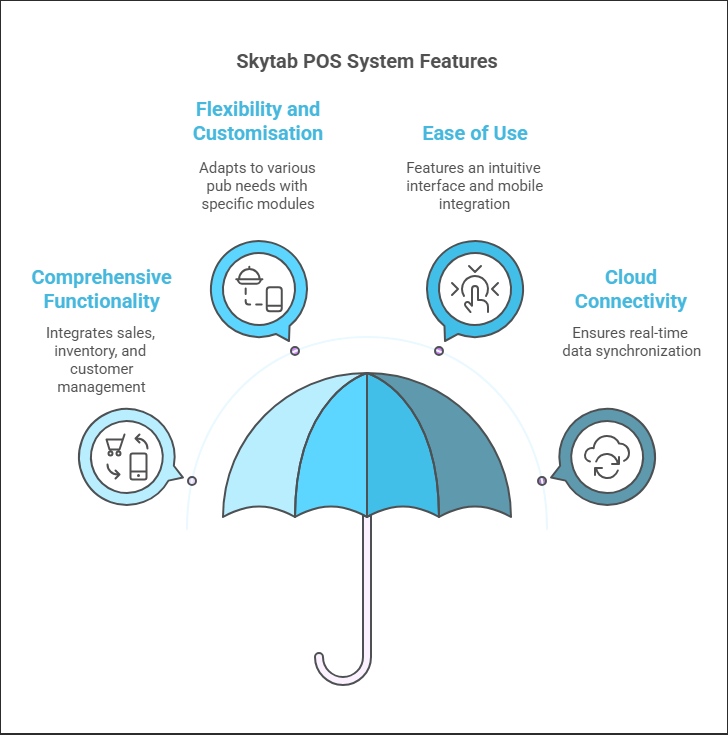
One noteworthy EPOS system that has garnered attention in the hospitality industry is the Skytab POS system. There are many systems available, but Skytab stands out for its innovative approach and robust feature set. Key aspects include:
Comprehensive Functionality:
Integrates sales, inventory, and customer management into one platform.
Offers advanced reporting and real-time analytics, which are crucial for making informed business decisions.
Flexibility and Customisation:
Designed to adapt to the unique needs of pubs, from small independent venues to larger chains.
Provides modules that cater specifically to the pub environment, such as stock management for drinks and kitchen orders.
Ease of Use:
The intuitive, touchscreen interface simplifies operations, allowing staff to quickly learn and use the system efficiently.
Mobile integration ensures that orders can be managed from anywhere on the premises, enhancing the overall customer experience.
Cloud Connectivity:
With a cloud-based system, data is synchronised in real-time, reducing downtime and ensuring accurate reporting.
This connectivity is vital for tenancy pubs, where operational efficiency and cost management are paramount.
The Skytab POS system exemplifies how a modern EPOS solution can revolutionise pub management, offering the tools needed to navigate the challenges of today’s dynamic hospitality landscape.
Pub Inventory Management
Effective inventory management is essential for pubs, where overstocking or understocking can quickly affect profitability. Pub inventory management systems integrated with your EPOS software provide:
Real-Time Tracking: Automated updates on stock levels as sales occur.
Order Automation: Streamline reordering processes with intelligent forecasting.
Cost Control: Monitor waste and theft, ensuring that stock is used efficiently.
Vendor Integration: Maintain smooth communication with suppliers for timely deliveries.
This system ensures that the right products are available at the right time, helping pubs avoid the pitfalls of manual stock management.
Kitchen Management Software: Keeping it Clean
A busy pub isn’t just about the bar; efficient kitchen operations are equally vital. Kitchen management software integrates with the overall pub management system to ensure:
Order Accuracy: Orders sent directly to the kitchen reduce miscommunication and errors.
Efficient Workflow: Optimised ticketing systems help kitchen staff prioritise orders.
Inventory Synchronisation: Seamless integration with inventory management ensures ingredients are tracked from delivery to plate.
Hygiene and Compliance: Better tracking of kitchen activities supports food safety standards and regulatory compliance.
A clean, well-managed kitchen not only improves service but also ensures a high standard of food quality, contributing to the pub’s overall reputation.
Benefits of an Integrated Pub Management System
Investing in a comprehensive pub management solution offers numerous benefits that extend beyond basic transaction processing:
Improved Efficiency:
By automating processes to reduce manual entry and human error, staff can focus on customer service while integrated inventory and kitchen management systems work in tandem to ensure seamless operations across all departments.
Enhanced Customer Experience:
Fast and accurate order processing, combined with seamless mobile ordering options, ensures that customers experience minimal wait times, leading to improved satisfaction and higher turnover during busy periods. With integrated pub analytics, pub owners can gain valuable insights into customer preferences, spending habits, and peak hours, allowing for more personalised service and tailored marketing campaigns.
Robust Reporting:
Real-time analytics offer valuable insights into sales trends, peak hours, and customer preferences, enabling a data-driven approach that supports strategic decision-making and helps identify opportunities for growth.
Cost Control:
Effective tracking of inventory, wastage, and staff performance helps reduce operational costs, while automated reordering processes ensure stock levels are maintained efficiently, preventing both overstocking and shortages, ultimately leading to smoother operations and improved profitability.
Scalability:
Whether you’re managing a single pub or multiple venues, a scalable pub management software system adapts to your business’s growth, while cloud-based solutions ensure that updates and expansions are seamlessly integrated without disruption, keeping operations efficient and future-proof.
Pub Management Software Made for the UK
As the UK pub industry continues to evolve, advanced pub management software is no longer optional—it’s essential for success. With features ranging from cloud-based POS to user-friendly interfaces and pub analytics, modern EPOS systems empower pub owners to streamline operations, enhance customer service, and maintain a competitive edge.
By considering key factors such as ease of use, integration capabilities, and specific needs of tenancy pubs, pub owners can choose the right system to meet their operational challenges. With the addition of cutting-edge features like mobile ordering, real-time analytics, and robust inventory management, the future of pub management looks more promising than ever.
Within the competitive hospitality landscape, leveraging technology is no longer optional—it’s a necessity. Restaurant management software has evolved to become the backbone of efficient operations, integrating everything from a robust POS system and kitchen management software to seamless inventory management and customer engagement tools. Choosing the right solution is a strategic decision that can streamline operations, reduce costs, and elevate the customer experience. This comprehensive guide will help you navigate the critical features and emerging trends in restaurant management software, ensuring your business stays ahead of the curve.
Understanding Restaurant Management Software
Restaurant management software is a comprehensive digital tool designed to integrate and streamline various aspects of your restaurant’s operations. It combines multiple functionalities that are critical for managing daily tasks efficiently.
Some of the key components include:
POS (Point of Sale) Systems: The central hub for processing orders, payments, and transactions.
Kitchen Management Software: Tools that help streamline order preparation and kitchen communication.
Inventory Management: Software to track ingredients and supplies, and reduce waste.
Scheduling Compliance Software: Solutions to manage employee schedules, payroll, and performance.
Customer Engagement: Features like QR code ordering and loyalty programmes that enhance the dining experience.
By understanding these elements, restaurant owners can tailor their technology investments to meet specific operational needs, ensuring every aspect of the business runs smoothly.
Key Features to Look For
When selecting restaurant management software, it’s essential to evaluate features that align with your operational requirements. Consider the following critical components:
Integrated POS System
Arobust POS system is the heart of any restaurant management solution. In the realm of cloud-based POS systems, having the most up-to-date features is crucial. It handles order processing and payments while providing valuable sales data.
Key benefits include:
Streamlined Transactions: Quick and efficient processing reduces wait times and improves service.
Real-Time Reporting: Access to sales analytics helps make informed business decisions.
Integration: Seamlessly connects with other systems like inventory and kitchen management software.
Kitchen Management Software
Efficient restaurant kitchen management is crucial for timely order preparation and ensuring food quality—Optimise kitchen operations with advanced kitchen display systems. Connect seamlessly with POS systems, reduce paper waste, and automate order flows.
Modern kitchen management software helps:
Improve Communication: Bridge the gap between front-of-house and kitchen staff.
Enhance Order Accuracy: Reduce errors through digital order management.
Optimise Workflow: Prioritise and manage orders during peak hours effectively.
Inventory Management
Perform inventory counts whenever needed, accurately forecast demand, access in-depth analytics, and streamline supplier management through automation. Real-time tracking minimised waste, and precise inventory management all contribute to enhanced profitability and operational efficiency.
Benefits can be like:
Real-Time Tracking: Monitor ingredient usage and prevent shortages.
Cost Control: Identify high-cost items and streamline purchasing processes.
Waste Reduction: Maintain optimal stock levels to minimise food waste.
Scheduling Compliance Software
Managing a restaurant’s staff can be challenging. Get a clear view of your schedule with weekly, fortnightly, and monthly overview options.Restaurant scheduling compliance software simplifies scheduling, attendance tracking, and payroll processing, ensuring:
Optimised Schedules: Align staffing levels with peak business hours.
Improved Productivity: Reduce labour costs by efficiently managing employee shifts.
Enhanced Communication: Facilitate timely updates and feedback between management and staff.
QR Code Ordering & Mobile Capabilities
Embracing technology such asQR code ordering is vital in today’s fast-paced hospitality environment. Transform the dining experience by enabling customers to scan codes, view digital menus, place orders, and pay directly from their mobile devices. This approach minimises the need for server interactions and speeds up service. Seamlessly unify in-store, online, and mobile ordering experiences with an omni-channel ordering system. Customers can place orders via a website, mobile app, or in-store kiosk while ensuring real-time synchronization with your POS system. This frictionless approach enhances convenience, reduces wait times, and maximizes revenue opportunities by catering to customers across multiple touchpoints.
This feature allows guests to:
Order Directly from Their Phones: Enhances convenience and minimises contact.
Reduce Wait Times: Accelerates the ordering process during busy periods.
Improve Accuracy: Digital menus reduce the risk of human error in order taking.
Loyalty Programme Integration
Promote sustainable growth with customised loyalty programs. Deliver individualised promotions and connect with guests across various touchpoints. Leverage data insights to track key metrics and uncover opportunities that drive repeat visits. Consider a gift card integration on top of this as a way to further drive customer retention and repeat business.
Integrating a loyalty programme within your restaurant management software can:
Reward Frequent Customers: Incentivise repeat visits through exclusive offers.
Gather Valuable Data: Understand customer preferences and behaviour.
Boost Revenue: Increase average order values and overall customer satisfaction.
Reservation System Integration
A reservation system streamlines the booking process, reduces wait times, and enhances customer satisfaction. By integrating reservations with your restaurant management software, you can:
Allow customers to book tables online, through an app, or via phone.
Automatically update table availability and prevent overbooking.
Send automated confirmation and reminder messages to reduce no-shows.
Track guest preferences and special requests to personalize the dining experience.
Seamlessly connecting a reservation system with your POS and customer database ensures smooth operations and better guest management.
POS System: The Heart of Restaurant Management Software
Areliable POS system is critical for any restaurant looking to enhance operational efficiency. Beyond processing transactions, modern POS systems integrate seamlessly with other management tools to provide a holistic view of your business.
Consider these advantages:
Efficient Order Processing: Speed up service and reduce customer wait times.
Integrated Payment Solutions: Manage restaurant deposits and streamline financial transactions.
Comprehensive Reporting: Access detailed analytics to monitor sales trends, inventory levels, and employee performance.
By choosing a POS system that fits your restaurant’s unique needs, you ensure that every transaction is smooth and secure, contributing to overall operational excellence.
Restaurant Inventory Management
Effective restaurant inventory management is critical to maintaining cost control and ensuring your kitchen runs smoothly. An integrated inventory management module within your restaurant management software can revolutionise how you handle supplies.
Why Inventory Management Matters
Proper inventory management offers several key benefits:
Cost Reduction: Prevent over-ordering and reduce waste with accurate tracking.
Streamlined Ordering: Automate the reordering processes to ensure you never run out of essential ingredients.
Improved Forecasting: Analyse your historical data to predict future needs and adjust orders accordingly.
Multi-location Coordination: Centralised inventory management ensures consistency and efficiency for restaurants operating in multiple locations
Essential Features for Inventory Management
When evaluating inventory solutions, look for features that address your specific needs:
Real-Time Tracking: Get immediate updates on stock levels, expiration dates, and usage trends.
Automated Alerts: Set up notifications for low stock or unusual consumption patterns.
Integration with POS: Ensure each sale is automatically reflected in your inventory count.
Reporting Tools: Make informed purchasing decisions by utilising detailed reports.
By implementing a robust inventory management system, restaurants can minimise waste, reduce costs, and ensure their kitchen is always stocked with fresh ingredients.
Kitchen Management Software: Cleaning it Up
Behind every successful restaurant is a well-coordinated kitchen. Kitchen Management Software (often integrated as epos kitchen solutions) plays a vital role in maintaining communication between the front-of-house and the kitchen, ensuring that orders are fulfilled efficiently and accurately.
Key Functions of Kitchen Management Software
Efficient kitchen operations rely on several core functionalities:
Order Routing: Automatically send orders to the appropriate kitchen stations for timely preparation.
Real-Time Updates: Keep the kitchen informed of order modifications, cancellations, or special requests.
Performance Monitoring: Track preparation times and kitchen efficiency to identify areas for improvement.
Seamless Integration: Ensuring kitchen operations are synchronised with your overall restaurant management software.
Benefits for Kitchen Operations
Adopting specialised kitchen management software can lead to:
Improved Efficiency: Streamlined communication reduces errors and speeds up service.
Better Quality Control: Consistent order tracking helps maintain high food quality and presentation.
Enhanced Staff Coordination: Clear, concise order details minimise miscommunication and delays.
Incorporating these tools into your restaurant’s workflow ensures that your kitchen keeps up with demand but also contributes significantly to an exceptional dining experience.
Hospitality Technology Trends
The hospitality industry is rapidly evolving, driven by technological advancements that redefine how restaurants operate. Here are some of the latest trends shaping the industry:
Cloud-Based Restaurant POS
The era of traditional, on-premise systems is giving way to the more agile, adaptable cloud-based models. Cloud-based restaurant software offers several crucial advantages in today’s dynamic market.
Benefits of Cloud-Based Solutions
Embracing POS cloud solutions can transform your restaurant operations in the following ways:
Real-Time Data Access: Monitor sales, inventory, and customer data in real-time from any device.
Scalability: Easily add new locations or upgrade features without extensive hardware investments.
Cost Efficiency: Reduce the need for expensive IT infrastructure and maintenance.
Enhanced Security: Benefit from regular security updates and data backups provided by cloud service providers.
Remote Management: Manage your restaurant from anywhere, making it ideal for multi-location businesses.
How Cloud-Based Systems Improve Operations
By moving to a cloud-based system, restaurants can:
Optimise Workflow: Seamless integration with various modules (order management, kitchen management, CRM) ensures a smooth operational flow.
Reduce Downtime: Cloud systems are designed to be resilient and reliable, minimising disruptions.
Facilitate Training: With accessible interfaces, new staff can be trained faster, reducing onboarding times and errors.
A cloud-based approach modernises your operations, positioning your restaurant for future technological advancements.
Contactless and Mobile Ordering
In today’s health-conscious environment, contactless ordering solutions are necessary for restaurants aiming to ensure customer safety and operational efficiency. Integrating mobile ordering with secure, contactless payment systems minimises physical interaction and modernises the dining experience for tech-savvy guests.
Benefits of Contactless and Mobile Ordering
Enhanced Safety: Customers can browse menus, place orders, and make payments directly from their smartphones—reducing the need for physical menus and cash handling.
Streamlined Service: With orders sent directly to the kitchen and payments processed digitally, wait times are reduced, and the overall dining experience becomes more efficient.
Improved Customer Experience: An intuitive digital interface allows diners to customise their orders and pay at their own pace, resulting in higher satisfaction and repeat visits.
Operational Efficiency: Reduced manual entry and paper-based processes lower the risk of errors, while real-time updates ensure every team member stays informed.
Cost Savings: Less reliance on printed menus and physical payment devices can cut operational costs, freeing up resources for other critical areas of your business.
Key Features to Look For
When considering contactless and mobile ordering solutions for your restaurant, keep these features in mind:
Mobile App Integration: A dedicated restaurant app can showcase your menu, allow for customisations, and handle secure payments – all in one place.
QR Code Ordering: Placing QR codes on tables or at pickup points directs customers to a digital menu, offering a quick and hygienic way to order.
Secure Payment Processing: To guarantee safe and fast transactions, ensure your system supports modern, secure payment methods, including NFC and mobile wallets.
Real-Time Order Updates: Instant notifications keep both the customer and the kitchen informed about order status, reducing miscommunication and delays.
Integrate contactless and mobile ordering into your restaurant operations, and keep pace with modern technology trends to significantly enhance the dining experience.
Customer Insights with Restaurant Analytics
Data is a powerful tool for decision-making. Restaurant reporting software provides deep insights into every aspect of your operations, enabling you to fine-tune your strategies and maximise revenue.
The Role of Analytics in Restaurant Success
Analytics help restaurants understand patterns and trends, which can lead to significant operational improvements:
Sales Trends: Identify peak hours, best-selling items, and seasonal variations.
Customer Behaviour: Learn about dining preferences, frequency of visits, and feedback to tailor your service.
Staff Performance: Monitor individual and team performance to optimise scheduling and training.
Marketing Effectiveness: Evaluate the success of restaurant marketing campaigns and adjust strategies accordingly.
Benefits of Integrated Analytics
Modern restaurant management systems seamlessly integrate analytics into their core functionalities, allowing you to:
Make Data-Driven Decisions: Utilise real-time reports to adjust operations on the fly.
Optimise Inventory: Avoid overstocking or understocking by analysing usage patterns.
Enhance Customer Experience: Use insights to improve service speed and personalisation.
In an increasingly competitive market, leveraging detailed analytics can provide the edge needed to drive sustained success.
QR Code Ordering: Enhancing Customer Experience
QR code ordering is rapidly becoming a staple in the modern dining experience. This technology offers several benefits that not only improve service speed but also elevate customer satisfaction:
Enhanced Safety: Minimises physical contact between staff and customers.
Streamlined Process: Allows guests to browse menus, place orders, and pay directly from their smartphones.
Operational Efficiency: Reduces errors associated with manual order taking, leading to faster service.
Increased Convenience: Supports a contactless experience that is particularly appealing in today’s health-conscious environment.
For restaurants seeking to modernise their operations, incorporating QR code ordering can lead to a significant competitive advantage.
User-Friendly Interface: Make Work Easy
A critical factor in the success of any epos system for restaurants is its ease of use. A user-friendly interface minimises training time, reduces errors, and ultimately enhances the overall efficiency of your operations.
Importance of an Intuitive Design
When choosing restaurant management software, the interface should be intuitive and straightforward. Consider these benefits:
Quick Adoption: Ensure peak hours are not disrupted by steep learning curves.
Efficient Operations: A clear, uncluttered design helps reduce mistakes and speeds up service.
Enhanced Communication: Easy-to-read displays facilitate better communication between the front-of-house and the kitchen.
Features That Enhance Usability
Look for systems with features designed to improve usability:
Touchscreen POS: Systems with touchscreen POS for restaurants provide a tactile, responsive experience.
Mobile Accessibility: Mobile POS for restaurants allow staff to manage orders and payments tableside.
Customisable Dashboards: Adapt the interface to highlight the metrics most important to your operations.
Prioritising an interface with simplicity and efficiency can be a game-changer, especially during the high-pressure periods that restaurants frequently encounter.
Click & Collect: Mobile Ordering Solution
In the wake of increasing demand for convenience, Click & Collect and mobile ordering solutions have become indispensable. These technologies not only enhance customer service but also streamline internal processes.
Advantages of Mobile Ordering
Implementing a mobile ordering solution can benefit your restaurant in multiple ways:
Increased Efficiency: Orders are transmitted directly to the kitchen, reducing wait times and improving accuracy.
Enhanced Customer Experience: Diners enjoy the convenience of ordering from their smartphones, whether on-site or off-premise.
Contactless Transactions: Particularly important in today’s health-conscious environment, contactless options ensure safety and convenience.
Key Features to Look For
For a robust mobile ordering system, ensure the software includes:
Tableside Ordering and Payment Systems: Enable staff to process orders and payments directly at the table, streamlining service.
Integration with Existing Systems: The mobile solution should integrate with your core POS, inventory, and analytics systems.
Real-Time Updates: Ensure both the kitchen and front-of-house are immediately notified of new orders or changes.
By adopting a mobile ordering system, restaurants can cater to the modern diner’s expectations and maintain a competitive edge.
Effective marketing is the lifeblood of any restaurant, driving repeat business and attracting new customers. Integrated marketing modules within restaurant management software can automate and optimise your restaurant marketing campaigns.
The Power of Automated Marketing
Automated marketing tools enable you to:
Target the Right Audience: Use customer data and behavioural insights to tailor promotions and offers.
Save Time and Resources: Schedule and automate email, SMS, and social media campaigns, reducing manual efforts.
Measure Campaign Success: Track engagement, conversion rates, and ROI to refine your strategies.
Key Marketing Features to Look For
When considering software for automated marketing, make sure it includes:
Loyalty Program Integration: Reward regular customers with incentives that encourage repeat visits.
Social Media Integration: Synchronise your campaigns across various platforms for broader reach.
Detailed Reporting: Monitor the performance of each campaign to identify what works best for your audience.
By leveraging automated marketing, restaurants can maintain consistent communication with their clientele and create campaigns that drive traffic and revenue.
Loyalty Programme: Building Repeat Customers
A well-integratedloyalty programme within your restaurant management software can transform occasional visitors into loyal patrons.
Here’s why a loyalty programme is essential:
Customer Retention: Reward frequent customers with points, discounts, or exclusive offers.
Data Collection: Gain insights into customer preferences to tailor promotions and services.
Enhanced Engagement: Foster a deeper connection between your brand and your customers.
Increased Revenue: Encourage repeat visits and higher spending per visit through targeted incentives.
By investing in loyalty programme features, you create a win-win situation where customers feel valued, and your restaurant enjoys sustained growth.
Making the Final Decision: Best Restaurant Management Software
The world of restaurant management software is expansive and ever-evolving, providing powerful tools that can streamline operations, boost customer satisfaction, and enhance profitability. From choosing the best POS system for restaurant operations to integrating cutting-edge cloud-based restaurant software and leveraging detailed restaurant analytics, every aspect of your business can benefit from these advanced solutions.
Choosing the best restaurant management software involves careful consideration of your unique business needs. Here are some actionable steps to help you make an informed decision:
Assess Your Requirements:
Determine which features (e.g., POS, kitchen management software, inventory management, and scheduling compliance software) are essential for your operations.
Consider whether advanced functionalities like QR codeordering and loyalty programme integration are a priority.
Scalability and Integration:
Ensure the software can grow with your business.
Look for solutions that seamlessly integrate with existing systems and third-party applications.
User-Friendly Interface:
Choose software that is intuitive and easy for your staff to learn and use.
Prioritize solutions with strong customer support and training resources.
Cost Considerations:
Evaluate the total cost of ownership, including subscription fees and any associated restaurant deposits or hardware investments.
Balance features and functionality against your budget.
Vendor Reputation and Reviews:
Research vendor history and read reviews from other restaurant owners.
Request a demo or trial period to assess the software’s capabilities first-hand.
By following these steps, you can confidently select a restaurant management software solution that not only meets your current needs but also positions your business for future growth.
Running a successful restaurant in today’s competitive landscape requires more than just delicious food and excellent service. It demands efficiency, data-driven decisions, and the ability to adapt and evolve to customer expectations. A modern EPOS system for restaurants is no longer a luxury, but a necessity for optimising operations and driving profitability. This guide will explore how the best POS system for a restaurant can revolutionise your business.
What is an EPOS System for a Restaurant?
An Electronic Point of Sale (EPOS) system is a comprehensive software and hardware solution designed to manage sales, orders, and transactions in a restaurant setting. A robust EPOS system acts as the central nervous system of your restaurant, integrating everything from order-taking and table management to inventory control and customer relationship management.
Key Benefits:
Enhanced Order Management: Streamlines order processing from the table to the kitchen.
Improved Customer Experience: Enables faster service with features like Tableside Ordering and Payment Systems.
Accurate Sales Reporting: Offers detailed insights that help refine business strategies.
Integrated Payment Solutions: Simplifies transactions for both customers and staff.
Understanding how to use an EPoS system in restaurants is crucial for leveraging its full potential. The right system can reduce errors, boost efficiency, and support customer retention management—all critical components for long-term success.
Core Restaurant POS System Features
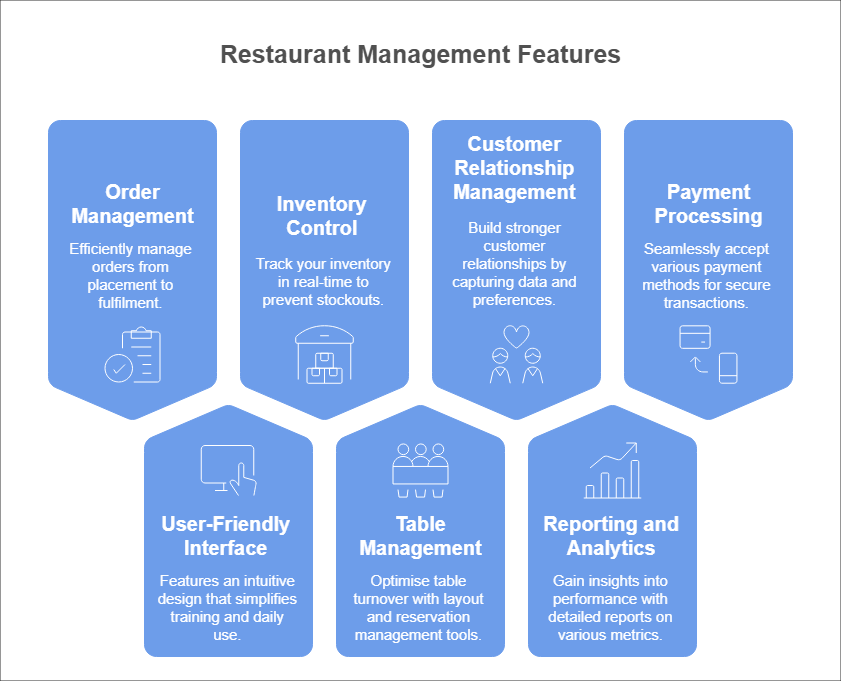
A truly effective restaurant POS system offers a range of features designed to enhance every aspect of your business. These core functionalities include:
Order Management: Efficiently manage orders from placement to fulfilment, minimising errors and speeding up service. This includes features like order modification, splitting bills, and managing special requests.
User-Friendly Interface: Features an intuitive design that simplifies training and daily use, paired with touchscreen functionality to boost speed and accuracy during high-volume periods.
Inventory Control:Track your inventory in real-time, preventing stockouts and reducing waste. Receive alerts when items are running low and automate purchase orders.
Table Management: Optimise table turnover with intuitive layout and reservation management tools. Visualise your dining room, track table status, and efficiently seat guests.
Customer Relationship Management (CRM): Build stronger customer relationships by capturing customer data, tracking preferences, and creating targeted promotions. Understand your customer base and personalise their dining experience.
Reporting and Analytics: Gain valuable insights into your restaurant’s performance with detailed reports on sales, inventory, labour costs, and more. Make informed decisions based on real-time data.
Payment Processing: Seamlessly accept various payment methods, including credit cards, debit cards, and mobile payments. Ensure secure and efficient transactions.
How to Use a POS System in Restaurants: An Expanded Step-by-Step Guide
Implementing an EPOS (Electronic Point of Sale) system may seem intimidating, but with a structured approach, you can smoothly transition to a system that enhances efficiency and customer experience. Here’s an in-depth look at each step in the process:
Step 1: Assessment of Needs
Evaluate Your Current Operations: Begin by mapping out your existing workflow. Look at every stage—from order taking and processing to payment and inventory management. Consider where delays occur or errors are frequent.
Identify Pain Points: Take note of issues such as slow order processing, payment delays, or miscommunications between the front-of-house and the kitchen. This insight helps you understand what you need most from a new system.
Example:
If you find that your servers struggle with outdated order-taking methods, a system with a modern, intuitive interface could significantly reduce mistakes and speed up service.
Step 2: Research and Selection
Search for Cloud-Based EPOS Systems: Investigate systems that offer cloud-based solutions. A cloud-based EPOS system allows remote access, easier updates, and integration with other digital tools.
Compare Features: Look at key functionalities such as order management, inventory tracking, payment processing, and reporting. Consider whether the system can scale as your business grows.
Evaluate Customer Support: Ensure the provider offers robust support. This is crucial during implementation and for troubleshooting any future issues.
Tip:
Create a checklist of your must-have features and use it to compare different systems. Read reviews and perhaps request demos to see how the system performs in a real-world scenario.
Step 3: Staff Training
Invest in Comprehensive Training: Arrange detailed training sessions for all staff members. This includes navigating the user-friendly interface and understanding the core functionalities, from taking orders to processing transactions.
Tailor Training to Roles: Customise sessions so that servers, kitchen staff, and managers know the aspects of the system relevant to their work. For instance, kitchen staff should focus on how orders are received and updated in real time.
Note:
Well-trained staff not only reduce errors but also help in smoothing the transition, as they can confidently assist each other during the initial phase.
Step 4: System Integration
Integrate with Existing Tools: Connect your new EPOS system with current kitchen management software, reservation platforms, and CRM tools. Integration is key to creating a seamless flow of information across your operations.
Ensure Seamless Connectivity: Verify that the connection between the EPOS system and front-of-house tools is smooth. This will ensure that when an order is taken, it is instantly communicated to the kitchen, and any updates are reflected in real time.
Consideration:
Test the integration on a small scale before rolling it out restaurant-wide to ensure that all systems communicate properly without data loss or delays.
Step 5: Trial Phase
Conduct a Pilot Run: Run the new system during off-peak hours to minimise risk. This trial phase is your chance to see the system in action without the pressure of a busy service.
Collect Feedback: Engage with your staff to understand their experiences using the system. Look for any difficulties they encounter or features that need tweaking.
Make Adjustments: Use the feedback to refine system settings, update training materials, or adjust integration points. This step ensures that issues are ironed out before full-scale implementation.
Reminder:
Document the feedback and the adjustments made. This record will be invaluable for future training sessions and system updates.
Step 6: Full Implementation
Plan a Strategic Rollout: Choose a go-live date that minimises disruption—ideally during lower customer traffic. Announce the change internally so everyone is prepared for the transition.
Monitor Performance: Once the system is live, closely observe its performance with key metrics such as order processing times, payment accuracy, and overall staff feedback.
Continue Staff Training: Offer refresher courses or additional training as needed. Continuous support helps ensure employees remain confident and proficient with the system.
Final Thought:
Successful implementation is an ongoing process. Regularly review system performance and stay updated with any new features or improvements offered by the provider.
Cloud-Based POS System
One of the most transformative advances in restaurant technology is the rise of cloud-based EPoS systems and PoS cloud solutions. These systems offer a range of benefits that are particularly attractive to modern restaurants:
Accessibility: Access your system from anywhere with an internet connection. Manage your restaurant remotely and monitor performance in real time.
Scalability: Easily scale your system as your business grows. Add new terminals and features without significant hardware investments.
Cost-Effectiveness: Reduce upfront costs with cloud-based subscriptions. Minimise IT expenses and maintenance fees.
Automatic Updates: Benefit from automatic software updates, ensuring you always have the latest features and security patches.
With cloud-based solutions, restaurant owners and managers can gain access to real-time analytics and insights, helping optimise operations and improve customer retention management.
Kitchen Management Solutions
Efficient kitchen operations are critical to the success of any restaurant. Integrated epos kitchen solutions are designed to streamline the communication between the front-of-house and the kitchen, ensuring that orders are processed accurately and quickly.
Display Orders: Display orders clearly on screens in the kitchen, eliminating paper tickets and improving communication between front-of-house and back-of-house staff.
Track Order Progress: Monitor the status of each order, ensuring timely preparation and delivery.
Manage Recipes: Access recipe information directly from the kitchen display system, ensuring consistency in food preparation.
Integrate your EPOS system with kitchen management tools, ensuring every order is prepared accurately and delivered. Thereby enhancing overall operational efficiency and customer satisfaction.
How to Set Up Your POS System: Your Easy Guide
Setting up your POS system can seem daunting, but it doesn’t have to be. Here’s a simplified guide:
1. Choose the Right System
Evaluate Requirements: Identify your business needs (features, scalability, budget) and industry-specific requirements.
Research Options: Compare vendors, read customer reviews, and check for reliable support and integration capabilities.
2. Hardware Installation
Gather & Install: Acquire necessary devices like POS terminals, printers, and barcode scanners, and arrange them according to your layout.
Connect & Test: Set up device connections (wired or wireless) and perform initial tests to ensure all hardware functions properly.
3. Software Setup
Install & Configure: Download and install the POS software, then customise it with your business details such as tax rates and payment methods.
Input Data: Enter inventory details, and pricing, and create user accounts; integrate with other systems as needed.
4. Staff Training
Plan & Execute: Develop a training program tailored to different roles with hands-on sessions and clear instructions.
Provide Resources: Supply user guides, video tutorials, and troubleshooting tips to support ongoing learning and quick problem-solving.
5. Go Live
Soft Launch: Begin with a trial run during off-peak hours to test the system’s performance and gather feedback.
Full Rollout: Officially launch the system after addressing any issues, while maintaining monitoring and support for smooth operation.
Beyond the Basics: Enhancing the Dining Experience
Modern EPOS systems offer a range of features that can further enhance your restaurant operations and customer experience:
Mobile Ordering Devices: Empower your staff with mobile ordering devices, allowing them to take orders and process payments tableside. This improves efficiency and provides a more personalised service.
Online Ordering and Delivery Integration: Integrate your POS system with online ordering platforms and delivery services, expanding your reach and increasing revenue.
QR Code Ordering: Offer customers the convenience of ordering and paying using their smartphones via QR codes.
Customer Retention Management: Utilise CRM features to track customer preferences, personalise offers, and build loyalty.
Investing in the best POS system for your restaurant is an investment in your future. By choosing the right system and utilising its features effectively, you can streamline operations, enhance customer experience, and drive profitability. Embrace the power of technology and watch your restaurant thrive.
Within the competitive hospitality landscape, leveraging technology is no longer optional—it’s a necessity. Restaurant management software has evolved to become the backbone of efficient operations, integrating everything from a robust POS system and kitchen management software to seamless inventory management and customer engagement tools. Choosing the right solution is a strategic decision that can streamline operations, reduce costs, and elevate the customer experience. This comprehensive guide will help you navigate the critical features and emerging trends in restaurant management software, ensuring your business stays ahead of the curve.
Understanding Restaurant Management Software
Restaurant management software is a comprehensive digital tool designed to integrate and streamline various aspects of your restaurant’s operations. It combines multiple functionalities that are critical for managing daily tasks efficiently.
Some of the key components include:
POS (Point of Sale) Systems: The central hub for processing orders, payments, and transactions.
Kitchen Management Software: Tools that help streamline order preparation and kitchen communication.
Inventory Management: Software to track ingredients and supplies, and reduce waste.
Workforce Management Software: Solutions to manage employee schedules, payroll, and performance.
Customer Engagement: Features like QR code ordering and loyalty programmes that enhance the dining experience.
By understanding these elements, restaurant owners can tailor their technology investments to meet specific operational needs, ensuring every aspect of the business runs smoothly.
Key Features to Look For
When selecting restaurant management software, it’s essential to evaluate features that align with your operational requirements. Consider the following critical components:
Integrated POS System
Arobust POS system is the heart of any restaurant management solution. In the realm of cloud-based POS systems, having the most up-to-date features is crucial. It handles order processing and payments while providing valuable sales data.
Key benefits include:
Streamlined Transactions: Quick and efficient processing reduces wait times and improves service.
Real-Time Reporting: Access to sales analytics helps make informed business decisions.
Integration: Seamlessly connects with other systems like inventory and kitchen management software.
Kitchen Management Software
Efficient kitchen management is crucial for timely order preparation and ensuring food quality—Optimise kitchen operations with advanced kitchen display systems. Connect seamlessly with POS systems, reduce paper waste, and automate order flows.
Modern kitchen management software helps:
Improve Communication: Bridge the gap between front-of-house and kitchen staff.
Enhance Order Accuracy: Reduce errors through digital order management.
Optimise Workflow: Prioritise and manage orders during peak hours effectively.
Inventory Management
Perform inventory counts whenever needed, accurately forecast demand, access in-depth analytics, and streamline supplier management through automation. Real-time tracking minimised waste, and precise inventory control all contribute to enhanced profitability and operational efficiency.
Benefits can be like:
Real-Time Tracking: Monitor ingredient usage and prevent shortages.
Cost Control: Identify high-cost items and streamline purchasing processes.
Waste Reduction: Maintain optimal stock levels to minimise food waste.
Workforce Management Software
Managing a restaurant’s staff can be challenging. Get a clear view of your schedule with weekly, fortnightly, and monthly overview options.Workforce management software simplifies scheduling, attendance tracking, and payroll processing, ensuring:
Optimised Schedules: Align staffing levels with peak business hours.
Improved Productivity: Reduce labour costs by efficiently managing employee shifts.
Enhanced Communication: Facilitate timely updates and feedback between management and staff.
QR Code Ordering & Mobile Capabilities
Embracing technology such asQR code ordering is vital in today’s fast-paced hospitality environment. Transform the dining experience by enabling customers to scan codes, view digital menus, place orders, and pay directly from their mobile devices. This approach minimizes the need for server interactions and speeds up service.
This feature allows guests to:
Order Directly from Their Phones: Enhances convenience and minimizes contact.
Reduce Wait Times: Accelerates the ordering process during busy periods.
Improve Accuracy: Digital menus reduce the risk of human error in order taking.
Loyalty Programme Integration
Promote sustainable growth with customized loyalty programs. Deliver individualized promotions and connect with guests across various touchpoints. Leverage data insights to track key metrics and uncover opportunities that drive repeat visits.
Integrating a loyalty programme within your restaurant management software can:
Reward Frequent Customers: Incentivize repeat visits through exclusive offers.
Gather Valuable Data: Understand customer preferences and behaviour.
Boost Revenue: Increase average order values and overall customer satisfaction.
Hospitality Technology Trends
The hospitality industry is rapidly evolving, driven by technological advancements that redefine how restaurants operate. Here are some of the latest trends shaping the industry:
Embracing Cloud-Based Solutions
Scalability:Cloud-based systems grow with your business, ensuring you’re never left behind.
Real-Time Updates: Access the latest features and security enhancements seamlessly.
Cost-Effective: Lower upfront costs compared to traditional on-premise systems.
Contactless and Mobile Ordering
The rise of QR code ordering and mobile apps has transformed the dining experience, providing:
Safety: Contactless transactions reduce health risks.
Convenience: Streamlined processes allow customers to order and pay with ease.
Enhanced Data Collection: Track customer preferences and order history for personalized marketing.
Data-Driven Decision Making
Modern restaurantmanagement software offers robust analytics and reporting features, enabling you to:
Monitor Performance: Real-time dashboards provide insights into sales, inventory, and staff productivity.
Optimize Operations: Data-driven insights help identify areas for improvement.
Forecast Trends: Anticipate demand and adjust inventory and staffing accordingly.
POS System: The Heart of Restaurant Management Software
Areliable POS system is critical for any restaurant looking to enhance operational efficiency. Beyond processing transactions, modern POS systems integrate seamlessly with other management tools to provide a holistic view of your business.
Consider these advantages:
Efficient Order Processing: Speed up service and reduce customer wait times.
Integrated Payment Solutions: Manage restaurant deposits and streamline financial transactions.
Comprehensive Reporting: Access detailed analytics to monitor sales trends, inventory levels, and employee performance.
By choosing a POS system that fits your restaurant’s unique needs, you ensure that every transaction is smooth and secure, contributing to overall operational excellence.
QR Code Ordering: Enhancing Customer Experience
QR code ordering is rapidly becoming a staple in the modern dining experience. This technology offers several benefits that not only improve service speed but also elevate customer satisfaction:
Enhanced Safety: Minimizes physical contact between staff and customers.
Streamlined Process: Allows guests to browse menus, place orders, and pay directly from their smartphones.
Operational Efficiency: Reduces errors associated with manual order taking, leading to faster service.
Increased Convenience: Supports a contactless experience that is particularly appealing in today’s health-conscious environment.
For restaurants seeking to modernize their operations, incorporating QR code ordering can lead to a significant competitive advantage.
Loyalty Programme: Building Repeat Customers
A well-integratedloyalty programme within your restaurant management software can transform occasional visitors into loyal patrons.
Here’s why a loyalty programme is essential:
Customer Retention: Reward frequent customers with points, discounts, or exclusive offers.
Data Collection: Gain insights into customer preferences to tailor promotions and services.
Enhanced Engagement: Foster a deeper connection between your brand and your customers.
Increased Revenue: Encourage repeat visits and higher spending per visit through targeted incentives.
By investing in loyalty programme features, you create a win-win situation where customers feel valued, and your restaurant enjoys sustained growth.
Making the Final Decision
Choosing the best restaurant management software involves careful consideration of your unique business needs. Here are some actionable steps to help you make an informed decision:
Assess Your Requirements:
Determine which features (e.g., POS, kitchen management software, inventory management, and workforce management software) are essential for your operations.
Consider whether advanced functionalities like QR codeordering and loyalty programme integration are a priority.
Scalability and Integration:
Ensure the software can grow with your business.
Look for solutions that seamlessly integrate with existing systems and third-party applications.
User-Friendly Interface:
Choose software that is intuitive and easy for your staff to learn and use.
Prioritize solutions with strong customer support and training resources.
Cost Considerations:
Evaluate the total cost of ownership, including subscription fees and any associated restaurant deposits or hardware investments.
Balance features and functionality against your budget.
Vendor Reputation and Reviews:
Research vendor history and read reviews from other restaurant owners.
Request a demo or trial period to assess the software’s capabilities first-hand.
By following these steps, you can confidently select a restaurant management software solution that not only meets your current needs but also positions your business for future growth.
The hospitality industry is undergoing a significant transformation, driven by technological advancements that enhance operational efficiency and elevate guest experiences. Central to this evolution is the adoption of cloud-based Point of Sale (POS) systems. These cloud based POS systems are not only replacing traditional setups but are also setting new standards for service delivery in hotels and restaurants.
The Shift to Cloud POS
Traditional POS systems often come with limitations such as high upfront costs, complex installations, and challenges in scalability. In contrast, a cloud based POS system offers flexibility, real-time data access, and seamless updates. This shift allows hospitality businesses to manage operations more efficiently, from anywhere, at any time.
Cloud POS solutions have revolutionized the way businesses in the hospitality sector operate. Unlike legacy systems, which require on-site servers and manual updates, cloud-based systems leverage the internet to store data remotely. This provides businesses with instant access to critical operational data, facilitates seamless software updates, and eliminates the need for expensive maintenance.
Another critical driver of this shift is the increasing reliance on mobile technology. Cloud POS systems are compatible with mobile devices, enabling businesses to streamline operations while improving customer service. Employees can take orders directly from guests via tablets or smartphones, reducing wait times and increasing efficiency. Additionally, cloud-based POS systems facilitate remote monitoring, allowing managers to oversee operations even when off-site.
Key Benefits of Cloud-Based POS Systems
Real-Time Data Access: Managers can monitor sales, inventory, and customer preferences in real-time, enabling informed decision-making and prompt responses to emerging trends.
Scalability: As businesses grow, cloud POS systems can easily scale to accommodate new locations or increased transaction volumes without significant additional investments.
Cost Efficiency: With lower upfront costs and reduced maintenance expenses, cloud POS systems are a cost-effective solution for many hospitality businesses.
Enhanced Customer Experience: Features like tableside ordering and integrated loyalty programs personalize the guest experience, leading to increased satisfaction and repeat business.
Business Continuity: Cloud-based systems ensure that data is securely backed up and can be easily restored in case of hardware failure or security breaches, but they also integrate well with physical security measures. Unlike traditional POS systems, cloud solutions mitigate the risks associated with on-site data storage.
Integration with Other Business Tools: Cloud-based POS systems can integrate with a wide range of tools such as customer relationship management (CRM) software, accounting platforms, and marketing automation solutions. This enhances efficiency and eliminates the need for manual data entry.
Integration with Other Systems
Modern cloud POS systems integrate seamlessly with other essential hospitality systems, such as property management and inventory management software. This integration ensures unified operations, reduces manual data entry, and minimizes errors, leading to more efficient and accurate service delivery.
Additionally, cloud-based POS solutions offer seamless connectivity with online ordering platforms, reservation management systems, and delivery services. This connectivity enables restaurants and hotels to provide a more comprehensive and convenient customer experience. Guests can place orders online, make reservations via apps, and even customize their dining preferences—all integrated within the cloud POS ecosystem.
Future Trends in Cloud POS for Hospitality
The future of a cloud based POS system in hospitality is promising, with several trends on the horizon:
Artificial Intelligence (AI) Integration: AI can analyse vast amounts of data to provide insights into customer behaviour, helping businesses tailor services and promotions effectively.
Mobile POS Systems: The use of mobile devices for processing transactions enhances flexibility and improves service speed, especially in dynamic environments like restaurants and event spaces.
Advanced Data Analytics: Leveraging data analytics allows businesses to forecast demand, manage inventory more effectively, and optimize staffing levels.
Voice-Activated Ordering Systems: The rise of voice recognition technology presents an opportunity for cloud POS providers to develop voice-activated ordering solutions. Customers will soon be able to place orders through voice commands, enhancing accessibility and convenience.
Blockchain for Security and Transparency: As cybersecurity threats continue to evolve, blockchain technology is emerging as a solution to enhance data security and improve transaction transparency in cloud POS systems.
Conclusion
The adoption of a cloud based POS systems is reshaping the hospitality industry, offering enhanced efficiency, scalability, and improved guest experiences. As technology continues to evolve, embracing these systems will be crucial for businesses aiming to stay competitive and meet the dynamic needs of their customers.
Cloud POS technology is more than just a trend—it is the foundation of the future of hospitality operations. By leveraging cloud solutions, businesses can unlock new opportunities for growth, efficiency, and customer satisfaction. As cloud POS providers continue to innovate, hospitality businesses must stay informed about emerging trends and technologies to remain ahead of the competition.
For more information on cloud POS solutions tailored for the hospitality industry, visit NFS Hospitality’s Cloud POS page.
Technology is advancing rapidly, transforming industries worldwide. For hospitality businesses, navigating the complex world of Point of Sale (POS) systems is crucial. Modern POS systems are more than just transaction tools; they’re vital for business intelligence. The UK has witnessed the emergence of several innovative POS companies in recent years, such as Zettle, SumUp, NFS hospitality and Lightspeed. Upgrading or investing in a new POS system can enhance operational efficiency, boost customer service, streamline inventory management, and improve financial reporting. Let’s explore how to turn this decision into a chance for transformative growth.
We’ve crafted this handy checklist to help you choose the perfect POS system for your business. With this guide in hand, you can confidently tackle the complexities of selecting a POS, making sure your choice meets today’s needs and sets you up for future success. Let’s explore the key features and considerations that will help your hospitality business flourish.
Essential Point of Sale System Checklist for Hospitality Businesses
Full Cost Considerations: Assess all associated costs, including upfront, rental, and ongoing fees.
Integrations:
Reservation Systems: Ensure compatibility with booking and reservation platforms.
Inventory Management: Look for seamless integration with inventory tracking systems.
Third-Party Delivery Apps: Check for easy connectivity with popular delivery services.
Customization: Evaluate the system’s ability to be tailored to your specific business needs.
User-Friendly Interface Importance: Prioritise systems with intuitive interfaces to reduce training time and improve staff efficiency.
Streamlining Payment Processes: Ensure the system supports efficient and varied payment methods to enhance customer experience.
Ensuring Data Privacy Compliance: Verify that the system complies with data protection regulations to safeguard customer information.
Training Support: Look for comprehensive training resources and support to facilitate smooth onboarding.
Cloud-Based vs. On-Premise Systems: Decide between cloud-based solutions for flexibility and remote access, or on-premise systems for greater control and security.
By considering these elements, you can choose a POS system that not only meets your current needs but also supports your business’s long-term success.
Full Cost Considerations
When selecting a Point of Sale system, it’s essential to consider the entire financial landscape. Look beyond upfront or rental fees to include SaaS subscriptions for ongoing updates and support, ensuring your system stays cutting-edge. Additionally, factor in card processing fees, as they impact your bottom line with each transaction. By evaluating these costs together, you can create a realistic financial forecast that aligns with your business goals, safeguarding your investment’s long-term value and supporting sustainable growth in the dynamic hospitality industry.
Here are some key financial considerations to keep in mind when selecting a Point of Sale system:
Upfront Costs: Evaluate the initial purchase price or setup fees for the POS hardware and software.
Rental Fees: Consider any ongoing rental charges if you opt for leasing the equipment instead of purchasing it outright.
SaaS Subscriptions: Account for monthly or annual fees for software updates, support, and additional features that keep your system current.
Integration Fees: Check for costs associated with integrating the POS system with existing software or third-party applications.
Card Processing Fees: Understand the transaction fees charged by payment processors, as these can significantly affect your profit margins.
Maintenance and Support Costs: Factor in any expenses related to technical support, repairs, or maintenance services.
Software Compatibility and Integration
Ensuring the compatibility of your POS system with existing software is paramount to creating a seamless experience across sales, inventory, and data management, thereby enhancing the overall efficiency of your hospitality establishment.
Taking advantage of integration capabilities allows different systems within your business to communicate and exchange data seamlessly. Most POS systems clearly display their integration capabilities within their tech stack, allowing you to easily determine how well they will fit into your current setup.
Reservation Systems
Streamlined bookings elevate service delivery and boost customer satisfaction significantly.
Incorporating seamless connectivity with a Point of Sale system, it facilitates a “one-stop solution.” This is not only a mark of convenience but enables a more personal touch, tailoring services to each guest’s preferences.
Commitment to investing in robust reservation systems can revolutionise the way you handle guest interactions. By integrating automated features such as real-time calendar updates and direct communication links, you ensure every aspect of your customer journey is meticulously curated, reinforcing your establishment’s reputation for excellence.
Inventory Management
Effective inventory management is pivotal for reducing waste and optimising supply chain efficiency in the hospitality industry.
Real-time Tracking: Implement a system that offers real-time updates on stock levels to avoid shortages or overstocking.
Integration: Ensure seamless integration of the POS system with your inventory management software for synchronised data.
Automated Reordering: Automate reordering processes to maintain optimal stock levels without manual intervention.
Reporting and Analytics: Leverage robust analytics tools to gain insights into consumption patterns and adjust orders accordingly.
Vendor Management: Manage supplier information effectively to facilitate timely order placements and deliveries.
A sophisticated point of sale system checklist should prioritise these inventory features for maximised operational efficiency.
Harnessing comprehensive inventory management tools can substantially enhance profitability and streamline back-of-house operations.
Third-Party Delivery Apps
In the fast-paced hospitality sector, integrating third-party delivery apps with your POS system can be transformative. For many venues, delivery services can account for a significant portion of their revenue, sometimes reaching as high as 30% or more. This underscores the importance of seamless integration, ensuring that orders are efficiently processed and managed.
Efficient app integration can enhance customer satisfaction while expanding your restaurant’s reach with minimal hassle.
Customization
In the dynamic world of hospitality, every establishment has its unique identity, aspirations, and customer base. A tailored approach to your point of sale system checklist can significantly amplify your brand’s distinctiveness.
Customisable features allow you to adapt the POS system’s appearance and functions to your specific business needs. This personal touch enhances operational efficiency.
Every element, including interface customisation and tailored reporting, underscores (and optimises) your brand’s value proposition.
Custom fields help in capturing necessary customer information for personalised service, propelling your guest experience forward.
When your POS resonates with your brand ethos, it communicates a commitment to excellence, offering value across interactions. Your capacity for innovation and leadership becomes apparent.
Indeed, there is no limit to where one’s idea of ‘customisation’ could lead. Confidently harnessing bespoke POS solutions could catalyse your voyage toward business success.
User-Friendly Interface Importance
Having a user-friendly interface is crucial for efficiency and ease of operations within any hospitality environment, and this area holds immense potential for growth.
Employees and guests both benefit when systems require minimal training.
Interface simplicity can significantly reduce onboarding time, ensuring staff spend more time on customer-facing duties rather than grappling with technology. Designing intuitive systems enhances productivity, promotes satisfaction, and fosters a positivity that resonates through the establishment.
For hospitality businesses seeking to stay ahead of the curve, a focus on the user experience can not only streamline operations but elevate guest interactions to consistently surpass expectations. As technology evolves, embracing the ‘ease of use’ as a benchmark can differentiate your service offering, ultimately winning the loyalty and trust of both staff and patrons.
Streamlining Payment Processes
Streamlining payment processes is paramount for hospitality businesses. By prioritising efficiency, a robust point of sale system checklist can set you on a trajectory towards seamless transactions.
Immediate authorisation speeds up customer service, enhancing satisfaction. Swift, error-free transactions are critical in hospitality’s fast-paced environment.
Additionally, adopting contactless options will further improve customer experience. The flexibility to accommodate diverse payment methods is now essential.
Integrated payment solutions also enhance operational effectiveness by reducing bottlenecks. Accessible transaction data allows for smarter business decisions.
Offering varied payment gateways accommodates modern consumer needs, reflecting progressive hospitality operations. Thus, optimising payment processes can drastically elevate customer interactions, brand credibility, and foster loyalty.
Ultimately, the art lies in how well your system marries efficiency with security. Elevating client experience means selecting technological advancements that both protect and serve.
Ensuring Data Privacy Compliance
In today’s digital age, data privacy is not just a priority but a legal obligation across many industries, particularly in hospitality.
When considering a point of sale system checklist for a hospitality business, ensuring data privacy compliance requires rigorous assessment of system security features. Your system should support encryption for cardholder information and personal data, alongside advanced threat detection to mitigate risks. Implementing these elements is vital to ensuring customer trust and safeguarding your establishment’s reputation.
Moreover, compliance with regulations such as GDPR is crucial. This entails knowing exactly how your customers’ data is handled, stored, and shared. It requires a system robust enough to offer top-tier data protection while allowing seamless operational functionality.
By prioritising data privacy compliance within your point of sale system, you not only adhere to necessary legal standards, but also demonstrate a steadfast commitment to your patrons’ security. This proactive stance will bolster customer confidence, attract more discerning clientele, and ultimately position your business as a leader in both service excellence and ethical responsibility.
Training Support
The success of any POS system hinges on quality staff training. A well-structured program tailored to your hospitality business ensures staff are confident and efficient from the start. Look for POS providers that offer comprehensive training and access to a resource library with online tutorials, FAQs, and live chat support. This ongoing support empowers your team to handle system challenges, fostering continuous learning and ensuring seamless service delivery. Ultimately, robust training enhances operational efficiency and upholds your establishment’s reputation for excellent customer service and innovation.
Future-Proofing Your POS System
Future-proofing your POS system is essential for adapting to the evolving hospitality industry. Choose a system with cloud capabilities for seamless updates and an open API for easy integration of third-party apps and new functionalities. Ensure it supports scalability to accommodate growth and new revenue streams without sacrificing efficiency. By selecting a POS that anticipates future trends, you secure long-term agility and success.
Cloud-Based vs. On-Premise Systems
The decision between a cloud-based and on-premise system hinges on the unique nuances of your hospitality business, financial landscape, and vision for growth. As you navigate this critical choice, a comprehensive understanding of each option will empower you to align technological implementation with strategic objectives.
Cloud-based POS systems offer the distinct advantage of anytime, anywhere access. This is invaluable for dynamic industries like hospitality where responsiveness is paramount.
Conversely, on-premise solutions provide greater control over data and functionality, which some organisations may prefer for top-tier privacy.
Furthermore, the cost structure of cloud systems typically involves a subscription model, offering scalable payments. This flexibility can be attractive for businesses aiming to manage costs effectively.
It remains vital to meticulously evaluate your operational needs against these options, acknowledging staff capabilities. Recognising the inherent advantages and limitations can ensure your POS system enhances productivity.
Ultimately, the best decision reflects your business’s ethos and future outlook. It’s about an innovative solution aligning with long-term objectives while maximising efficiency and guest satisfaction.
Conclusion
Your POS system is crucial. The right point of sale system checklist can transform operations and enhance customer experiences. Evaluate features tailored to your goals for quality service.
As technology evolves, choose a POS that aligns with your vision to streamline operations and boost competitiveness. NFS Hospitality offers hospitality tech solutions to support your growth and ensure sustained success, request a demo now to find out more.
The choice of a Point of Sale (POS) system can significantly impact the operational efficiency, customer experience, and ultimately, the success of a business. POS systems, serving as the hub of sales, inventory management, and customer management, have evolved from mere cash registers to sophisticated platforms that offer many features to support businesses in their daily operations. You need to get the right software as on-premise or cloud based pos systems for retail are not designed for restaurants – you need to get something tailored.
At the heart of this evolution is a critical decision that businesses, regardless of size and industry, find themselves grappling with: should they opt for a cloud-based POS system that boasts flexibility and real-time access, or a traditional on-premise solution known for its reliability and control? The answer is not straightforward, as each option comes with its unique set of advantages and challenges.
It is essential to keep in mind that the right choice varies from one business to another, depending on various factors such as the nature of the business, budget constraints, and specific operational requirements.
With this guide we want you to be able to choose the best EPOS system for restaurants for your business.
Overview of Cloud-based POS systems
Cloud-based POS systems represent a modern approach to managing sales and operations, harnessing the power of the internet to offer businesses a flexible and scalable solution. Unlike traditional systems, a cloud POS operates on a software-as-a-service (SaaS) model, where the software is hosted on remote servers and accessed via the web or an app. This model offers several distinct advantages and some drawbacks that businesses need to consider.
Key features and benefits:
Accessibility: one of the hallmark features of cloud-based POS systems is their accessibility. Business owners and managers can access sales data, inventory levels, and customer information in real-time from anywhere in the world, provided they have an internet connection. This level of accessibility supports informed decision-making and allows for greater flexibility in managing operations remotely.
Scalability: as businesses grow, their needs change. Cloud POS systems are inherently scalable, allowing businesses to add more registers, locations, or features with minimal hassle. This adaptability ensures that the POS system can grow alongside the business, without the need for significant overhauls or investments.
Cost-effectiveness: initially, cloud-based systems may appear more budget-friendly, especially for small to medium-sized businesses, due to their subscription-based pricing models. There’s no need for substantial upfront investments in hardware or software licenses. Instead, businesses pay a monthly or annual fee that often includes updates, maintenance, and technical support, reducing the total cost of ownership.
Potential drawbacks:
Dependency on internet connection: The primary limitation of cloud-based POS systems is their reliance on a stable and fast internet connection. Should the internet go down, accessing the POS system or processing transactions can become challenging, potentially disrupting business operations.
Ongoing costs: while the initial costs are lower, the subscription fees can add up over time, making it more expensive in the long run. Businesses need to carefully consider their long-term costs when opting for a cloud-based system.
Data security concerns: storing sensitive business and customer data on remote servers brings about concerns regarding data security and privacy. Reputable cloud POS providers invest heavily in security measures, but businesses should conduct thorough research to ensure their data will be protected against breaches.
Overview of On-premise POS systems
On-premise POS systems are the traditional choice for many businesses, offering a more conventional approach to sales and inventory management. Unlike their cloud-based counterparts, on-premise solutions are installed locally on a business’s servers and run on its network. This setup provides businesses with full control over their POS system and data, but it also comes with its set of challenges and considerations.
Key features and benefits:
Control and ownership: the most significant advantage of on-premise POS systems is the level of control and ownership they offer. Businesses have complete autonomy over their system, including customisation, data management, and security protocols. This control is particularly appealing for businesses with highly specific needs or those operating in industries with stringent data protection regulations.
Offline functionality: on-premise systems do not rely on an internet connection to operate. Transactions and operations can continue seamlessly, even during internet outages, making them reliable in environments where connectivity is inconsistent or unreliable.
One-time investment: although the initial cost of an on-premise POS system can be high—due to hardware purchases, software licenses, and setup fees—it’s a one-time investment. Over time, this can be more cost-effective than recurring subscription fees associated with cloud-based solutions, especially for larger businesses with the capital to invest upfront.
Limitations:
High upfront costs: the initial investment for on-premise POS systems is significant, making it a less viable option for small businesses or startups with limited budgets. The cost includes not only the software and hardware but also maintenance and potential upgrades.
Maintenance and updates: businesses are responsible for maintaining their on-premise systems, including hardware repairs and software updates. This responsibility requires in-house IT expertise or external support contracts, adding to the operational costs.
Scalability issues: scaling an on-premise POS system can be more complex and costly than a cloud-based solution. Expanding the system to accommodate business growth often requires additional hardware purchases and software licensing fees, as well as potential downtime during the upgrade process.
Comparative analysis
When choosing between a cloud based POS system and on-premise POS systems, businesses must weigh various factors to determine which solution aligns best with their operational requirements, budget, and long-term goals. This comparative analysis delves into the performance, security, and cost implications of each system, offering insights to help make an informed decision.
Cloud based POS systems are ideal for businesses that operate in multiple locations or require remote access to their sales and inventory data. The flexibility and real-time data synchronization make it easier to manage operations on the go. However, performance for cloud based pos systems heavily depends on internet connectivity, which can be a limiting factor in areas with unreliable internet service.
On-premise POS systems excel in environments where stability and speed are paramount, and internet connectivity might be sporadic. Since the system operates independently of an internet connection, businesses can ensure consistent performance even in offline modes. This makes it suitable for high-volume transactions in settings like large bars, clubs and restaurants.
Security Aspects: data security in cloud-based systems involves trusting a third-party provider to safeguard sensitive information. While reputable cloud-based POS systems for restaurants providers implement robust security measures, the nature of cloud storage inherently poses risks, especially in scenarios of widespread cyber threats. Businesses must assess the provider’s security credentials and compliance with industry standards.
On-premise systems offer businesses the opportunity to tailor their security measures to specific needs, potentially providing a higher security level. Since the data is stored locally, businesses have more control over access and protection. However, this also means that the responsibility for security updates and breach prevention falls squarely on the business, requiring a dedicated IT security team.
Cost implications: cloud-based pos systems for restaurants typically have lower initial costs due to their subscription model, which includes updates and support, making them attractive for small to medium businesses. On-premise systems, with their high upfront investment for hardware and software, might seem less appealing initially but can offer cost benefits in the long run.
The ongoing subscription costs of cloud-based POS systems can accumulate, potentially making them more expensive over an extended period. Conversely, on-premise systems, despite their higher initial cost, may become more economical, as businesses only incur significant costs during upgrades or expansions.
How EPOS Systems Improve Customer Experience
A modern point of sale system goes beyond processing transactions; it enhances the customer experience. For instance, restaurants using EPOS solutions can speed up table service with mobile ordering and payment options.
Additionally, you’ll benefit from quicker checkout processes and personalised promotions based on purchase history. These features not only improve customer satisfaction but also drive repeat business, making POS systems a valuable investment.
Sustainability: Cloud POS vs Traditional POS
Hospitality businesses are increasingly prioritising sustainability, and a cloud POS system often aligns with these goals. Cloud-based systems eliminate the need for bulky hardware and reduce energy consumption associated with on-premise servers.
The ability to access data remotely minimises the need for printed reports and paperwork. For eco-conscious businesses, this is an additional advantage of choosing a cloud POS solution.
Integrating EPOS with Other Business Tools
To maximise the benefits of your EPOS system, integration with other tools such as accounting software, payroll systems, and marketing platforms is essential. These integrations save time and reduce errors by automating tasks such as syncing sales data with your financial records.
For restaurants, integrating an EPOS system with online ordering platforms ensures seamless order management, enhancing operational efficiency.
Conclusion
Deciding between a cloud based POS system and on-premise POS systems requires a careful assessment of your business’s operational requirements, budget, and growth aspirations.
While cloud-based systems offer flexibility and ease of scaling, on-premise systems provide control and reliability, especially in environments where internet connectivity is a concern. It’s crucial to weigh the pros and cons of each system against your business needs and consider the long-term implications.
We encourage restaurateurs to thoroughly research the market. We can help. Our experts at NFS offer unbiased consultancy providing a tailored best of breed solution based on your needs and future growth plans. We integrate with industry-leading partners to provide functionality that will streamline your efficiency and drive profits today and for many years to come.
A modern cloud EPOS not only streamlines your sales and payment processes but also supports integrations that elevate every aspect of your business.
Having the right integrations connected to your EPOS system can make all the difference.
To give you a better idea of what you might need, let’s explore the best kinds of integrations for hospitality cloud EPOS systems that can help transform your operations, boost productivity, and enhance overall service quality.
Top Integrations to Consider
Integrating cloud EPOS systems with various tools can elevate your hospitality business’s performance, making operations more streamlined and customer experiences more memorable.
Here’s a deeper look into the top integrations to consider:
1. Reservation and Booking Software
Integrating reservation and booking platforms, such as OpenTable or SevenRooms, with your cloud based POS system ensures that table management and booking processes run smoothly:
Benefits: Helps synchronise reservation data with real-time table availability, minimising double bookings and optimising seating arrangements. This lets staff prepare for guest arrivals more effectively, reducing wait times and improving service efficiency.
Enhanced Guest Experience: Customers benefit from an organised reservation process, quick check-ins, and personalised service based on prior booking history.
2. Loyalty and Rewards Programs
Boost customer retention and encourage repeat business by integrating loyalty platforms like Paytronix or COMO with your EPOS:
Drive Repeat Business: With loyalty program integration, customers can easily accumulate points and redeem rewards during transactions. This incentivises repeat visits and increases brand loyalty as guests feel recognised and rewarded for their continued business.
Simplified Management: Loyalty program integrations automatically track and apply rewards, making it easier for both staff and customers to manage benefits.
3. Accounting and Financial Tools
Integrating accounting platforms like Xero or QuickBooks with your EPOS system is essential for streamlined financial management:
Automated Data Sync: Sales data from your EPOS system can be automatically transferred to your accounting software, ensuring that your books are always up to date without manual data entry. This reduces errors and saves valuable time.
Comprehensive Financial Reporting: Generate real-time financial reports that provide insights into cash flow, profit margins, and other financial metrics, helping you make informed decisions.
4. Inventory Management Systems
Integrations with inventory management tools like Nory offer real-time tracking and automated updates that improve stock control:
Real-Time Tracking: With inventory management integrations, stock levels are adjusted automatically as items are sold, helping prevent overselling and understocking. This leads to better cost control and purchasing decisions.
Replenishment Automation: Set thresholds for automatic stock replenishment notifications, ensuring your inventory stays well-maintained without manual checks.
5. Customer Relationship Management (CRM)
Integrating a CRM tool like HubSpot or Zoho CRM with your cloud EPOS system can personalise customer interactions and amplify marketing efforts:
Personalised Service: CRM integration allows you to collect and access customer data, including preferences, purchase history, and feedback. This enables your staff to offer tailored experiences that foster stronger customer relationships.
Targeted Marketing Campaigns: Utilise customer data to segment audiences and send targeted promotions, increasing the likelihood of repeat business.
6. Third-Party Delivery Platforms
Connecting your EPOS with third-party online ordering like Uber Eats or Deliveroo simplifies order management:
Seamless Order Processing: Orders placed through delivery apps are automatically sent to your EPOS system, reducing manual entry and the risk of errors. This leads to faster, more accurate order fulfilment.
Centralised Control: Manage all delivery orders from your POS systems’ dashboard, streamlining the process for both the kitchen and front-of-house staff.
7. Staff Scheduling and Management
EPOS integration with Workforce management tools like Harri or Nory simplify staff management:
Optimised Scheduling: Integration allows managers to create staff schedules based on sales forecasts and peak hours, ensuring the right number of staff members are available when needed. This helps prevent over- or understaffing, reducing labour costs while maintaining service quality.
Performance Tracking: Employee performance data can be tracked, such as individual sales contributions and productivity metrics.
These integrations empower hospitality businesses to create an interconnected system that enhances every facet of operations—from customer interactions to backend efficiency—ultimately boosting overall productivity and profitability.
Emerging Integrations in Hospitality Tech
The hospitality industry is continually evolving, with new technology integrations shaping how businesses operate and interact with their customers.
These are some of the most impactful emerging integrations in hospitality tech:
1. AI-Based Integrations for Data Analysis
AI is transforming how businesses in the hospitality sector gather, analyse, and act on data.
Integrating AI-based tools with cloud based POS systems can provide insights that drive better decisions:
Enhanced Customer Insights: AI-based data analysis tools can track and analyse customer behaviour, preferences, and spending patterns. This lets businesses tailor marketing campaigns, personalise guest experiences, and create targeted promotions.
Predictive Analytics: AI integrations can predict future trends based on past data, helping businesses prepare for peak periods, adjust inventory, and plan staffing accordingly. This approach minimises waste and improves resource allocation.
Operational Efficiency: AI can assist in automating repetitive tasks, like inventory replenishment and report generation, freeing up staff to focus on customer service and other critical areas.
2. Contactless Payment Solutions and Digital Wallets
The demand for convenience and speed in transactions has made contactless payment solutions and digital wallets essential integrations for modern hospitality businesses:
Enhanced Guest Experience: Contactless payment methods like Apple Pay offer customers a quick and seamless way to pay. This not only speeds up the checkout process but also meets the growing expectation for hygienic transactions.
Improved Payment Security: Contactless payment solutions are equipped with advanced security features that protect customer data and reduce the risk of fraud.
Wider Payment Options: By integrating contactless payment systems, businesses can offer flexible payment options that cater to diverse customer preferences, boosting customer satisfaction and potentially increasing sales.
3. Integrations Supporting Sustainability
Sustainability is a growing focus for both businesses and customers in the hospitality industry.
Integrating eco-friendly tools that support sustainability can help businesses meet these expectations while improving their bottom line:
Reducing Food Waste: Waste reduction tools such as Winnow track food usage and waste patterns. Through AI-powered image recognition and data analytics, these tools can identify areas where food waste is most prevalent and suggest adjustments to inventory and menu planning. This leads to cost savings and aligns with sustainable business practices.
Eco-Friendly Inventory Management: Integrations that monitor and manage inventory efficiently can prevent over-ordering and reduce spoilage, supporting a more sustainable supply chain.
Customer Engagement with Sustainability Initiatives: Sustainability-focused integrations can also inform customers of a business’s eco-friendly practices, fostering a positive brand image and appealing to environmentally conscious consumers.
Emerging integrations in hospitality tech are setting the stage for a more data-driven, customer-centric, and eco-friendly future.
By adopting these tools, hospitality businesses can stay competitive, improve their operations, and meet the evolving expectations of their customers.
Tips for Choosing the Right Integrations
Selecting the best integrations for your cloud EPOS system is crucial to ensuring that your business reaps maximum benefits.
Below are some key tips to guide you in making the right choices based on the type and size of your business’ unique needs:
1. Considerations Based on the Type and Size of Your Hospitality Business
Integrations should align with your specific business needs and scale.
Here’s how to approach this based on different types and sizes of hospitality businesses:
Small Cafés and Independent Restaurants: Focus on integrations that address core needs without overwhelming your system or budget. Essential integrations might include basic reservation software, simple loyalty programs, and inventory management tools.
Mid-Sized Restaurants and Chains: For businesses with higher traffic and multiple locations, consider more robust integrations that support multi-location management, CRM systems, and employee scheduling tools. These standardise operations and maintain consistency across all sites.
Large-Scale Hotels and Hospitality Groups: Larger operations need scalable integrations. This includes integrating with property management systems (PMS), accounting software, CRMs, and real-time inventory management systems.
Type of Establishment: A fine dining restaurant might benefit more from high-level reservation and customer experience integrations, while a fast-casual eatery might prioritise third-party delivery platforms and staff management tools.
2. Budget and ROI Analysis
Investing in integrations should be seen as a strategic move that enhances your profitability over time.
Conduct a budget and ROI analysis to ensure that the integrations you choose are both cost-effective and beneficial in the long run:
Initial Costs vs. Long-Term Savings: Weigh the initial setup costs of integrations against the potential savings they offer in terms of time, labour, and operational efficiency. For instance, an investment in automated inventory management may have upfront expenses but can significantly reduce waste and manual tracking costs over time.
Subscription and Maintenance Fees: Some integrations come with ongoing subscription fees or maintenance costs. Make sure to factor these into your budget and compare different providers to find the best value for your needs.
Projected ROI: Evaluate how each integration can contribute to your revenue. For example, integrations with loyalty programs may encourage repeat business, while employee scheduling tools can reduce labour costs.
Trial and Pilot Programs: Take advantage of free trials or pilot programs offered by integration providers. This allows you to test the compatibility and effectiveness of the software before committing to a long-term contract.
Integration Compatibility and Future Growth: Choose integrations that are compatible with your current cloud EPOS system and can scale as your business grows. This ensures you won’t need to overhaul your entire system when your operations expand, saving on future costs and disruptions.
Selecting the right integrations requires balancing practicality, financial feasibility, and strategic fit.
By carefully considering your business type and scale, and performing a thorough budget and ROI analysis, you can make informed decisions that enhance your cloud EPOS system’s capabilities and support your long-term business goals.
Integrations for Boosting Functionality
Strategic integrations can turn a standard cloud EPOS system into a powerhouse of functionality, tailored to meet the diverse needs of a hospitality business.
Without integrations, an EPOS system may handle basic sales and payment functions effectively, but it won’t fully maximise efficiency. By incorporating certain integrations, businesses can unlock several benefits:
Streamlined Operations: Integrations enable your EPOS system to communicate directly with other tools and platforms, such as reservation systems and kitchen display units. This leads to smoother service delivery, faster transaction processing, and less operational friction.
Enhanced Customer Experience: Integrations like CRM and loyalty program software ensure that customer data and preferences are accessible at every point of service. This allows you to offer personalised service, targeted promotions, and a superior guest experience.
Unified Management of Multiple Business Functions: From inventory tracking and accounting to employee scheduling and performance monitoring, integrations centralise these functions within the EPOS system. This not only makes it easier to track of day-to-day operations and provides a view of the business’s health in real time.
Improved Data Accuracy and Reporting: When systems like inventory management, financial tools, and customer feedback platforms are integrated, data flows seamlessly between them. This synchronisation ensures that reports generated by the EPOS system are up-to-date and accurate, giving decision-makers more reliable insights for strategic planning and performance reviews.
Flexibility and Scalability: Integrations offer the flexibility to customise your EPOS system to match the unique needs of your business. As your business grows or your needs change, you can add or modify integrations to scale operations without overhauling your entire system.
Reduced Costs and Increased Efficiency: Automation helps reduce labour costs by minimising the need for manual tasks and repetitive work. For example, integrating accounting software can streamline invoicing and payroll processing, saving both time and resources.
In general, integrations empower a cloud EPOS system to become more than just a transactional tool; they transform it into a solution that supports every aspect of a hospitality business.
Key Benefits of Cloud EPOS Integrations
1. Improved Operational Efficiency
Integrating your cloud EPOS with other essential business tools streamlines the flow of information and reduces the need for manual input across different systems. This leads to:
Automation of Repetitive Tasks: Time-consuming processes like updating inventory, managing orders, and processing payments can be automated through integrations.
Real-Time Data Synchronisation: Integrated systems ensure that information is updated in real time. For example, when a sale is made, inventory counts adjust automatically, and accounting records are updated instantly.
Simplified Workflow: With interconnected systems, employees can navigate fewer platforms to accomplish tasks. A single dashboard might display sales data, bookings, and inventory, speeding up decision-making and day-to-day operations.
2. Enhanced Customer Experience
Customer satisfaction is a cornerstone of success in the hospitality industry. Integrations with a cloud EPOS system help elevate the customer experience by enabling personalised and efficient service:
Personalised Interactions: Integrating with CRM software allows businesses to store customer preferences and feedback. This helps staff offer tailored recommendations and promotions.
Loyalty Programs and Promotions: Integrations with loyalty platforms enable seamless point collection and reward redemption, encouraging repeat visits and a positive connection with your brand.
Faster and Contactless Payments: Payment integration supports a range of payment methods, speeding up transaction times and giving customers flexibility in how they pay.
Enhanced Order Accuracy: When orders are processed through integrated systems that link the front of the house to the kitchen and bar, the chances of errors decrease. This ensures customers receive exactly what they ordered, which boosts satisfaction and reduces complaints.
3. Streamlined Staff Management
Effective management of employees is vital to running a smooth hospitality business, and cloud EPOS integrations can make this easier and more efficient:
Automated Scheduling: Integrations with workforce management tools help automate shift scheduling, ensuring that staffing levels are optimised to match peak hours and special events. This reduces the burden on managers and improves coverage without overstaffing.
Performance Tracking: By linking EPOS data with employee management systems, you simplify performance tracking. Metrics such as sales per hour, upsell success rates, and table turnover can be analysed to reward staff or provide targeted training.
Time Clock Integration: Integrating time-tracking software with your EPOS system allows employees to clock in and out through the same platform, simplifying payroll processing and maintaining records.
Streamlined Communication: Communication integrations allow managers and staff to send real-time updates, shift changes, and announcements directly within the EPOS system, improving coordination and response times.
Conclusion
Incorporating the right integrations into your cloud EPOS system can transform how your hospitality business operates and serves its customers.
From AI-driven data analysis that sharpens decision-making to contactless payment solutions that cater to modern customer preferences, and sustainability-focused tools that align with eco-friendly practices, these emerging technologies offer substantial benefits.
By carefully considering your business’s type, scale, and budget, and focusing on integrations that deliver a tangible ROI, you can create a streamlined, efficient, and future-ready operation.
Embracing these integrations not only enhances operational efficiency and customer satisfaction but also positions your business as an innovative leader in the ever-evolving hospitality landscape.
To take your hospitality business to new heights,contact NFS Hospitality to find the right cloud EPOS for your operation.
In the restaurant industry, efficiency and adaptability are key to staying competitive.
If you’re a restaurant owner, you probably already have one in place, but are you leveraging its full potential?
In this guide, we’ll look at practical strategies to maximise your restaurant’s cloud EPOS capabilities—from advanced reporting to seamless integration with other tools—so you can improve service, optimise costs, and ultimately drive growth.
Optimising Order Management and Speed of Service
In hospitality, every second counts, and the speed of service can make or break the customer experience. A cloud-based POS system can improve how orders are managed and processed, reducing wait times, enhancing accuracy, and creating a more efficient workflow.
1. Mobile Ordering and Tableside Service
Mobile ordering allows servers to take orders directly at the table using a handheld device, such as a tablet or smartphone. This eliminates the need to run back and forth to a central POS terminal.
Orders are immediately sent to the kitchen, allowing the kitchen staff to start preparing meals without delay, leading to faster turnaround times and an enhanced customer experience.
Advantages of Mobile Ordering:
Increased Order Accuracy: Orders entered tableside reduce the chance of miscommunication.
Enhanced Upselling Opportunities: With customer data and item suggestions readily available, servers can easily offer add-ons or upgrades.
Streamlined Payment Process: Servers can also process payments at the table, minimising the wait for bills and improving table turnover rates.
2. Integrated Kitchen Display Systems (KDS)
A KDS replaces traditional paper tickets with digital screens that organise and display orders as they come in. This allows kitchen staff to see orders immediately, with colour-coded indicators for priority orders, items ready to be served, and any customisations or dietary requirements.
Benefits of KDS:
Reduced Order Confusion: The KDS displays each item’s status, helping chefs and kitchen staff keep track of what needs to be prepared.
Improved Workflow: Orders are organised by priority, ensuring that dishes are prepared in the correct order, helping the team maintain a smooth workflow, even during rush hours.
Real-Time Order Updates: If a customer makes a change to their order, the KDS updates immediately, preventing errors and communicating to the kitchen instantly.
3. Order Batching and Efficient Course Management
For large parties or busy times, cloud based systems can batch orders, grouping similar items to be prepared simultaneously. This minimises the time it takes to prepare and deliver each course, creating a seamless dining experience, especially for group diners who expect courses to be served together.
Batching and Course Control Benefits:
Reduced Preparation Time: Grouping similar orders reduces prep time and improves kitchen efficiency.
Enhanced Customer Satisfaction: Guests receive dishes simultaneously, improving the dining experience for larger parties.
4. Self-Ordering Options
Cloud EPOS systems can facilitate self-ordering kiosks or tableside tablets, where customers can place orders directly. This option speeds up service, especially for casual dining settings, by allowing customers to control their experience and reducing wait times
Self-Ordering Benefits:
Empowered Customers: Guests can place and customise their orders without waiting, allowing them to enjoy a personalised experience.
Minimised Errors: When customers place their orders themselves, there’s less room for error, which reduces dissatisfaction and returns.
5. Real-Time Communication and Notifications
Communication between front-of-house and back-of-house staff is crucial for efficient service.
With a cloud based system, any updates on customer orders are instantly shared, and notifications can alert servers when items are ready.
Real-Time Updates and Notifications:
Improved Coordination: Real-time notifications allow staff to communicate efficiently, ensuring that orders are served at their best.
Reduced Wait Times: Prompt communication minimises the time food spends waiting to be served, maintaining quality and customer satisfaction.
Enhancing Customer Experience Through Personalisation
Personalised service can be the key differentiator that keeps customers coming back. A cloud EPOS system can serve as a powerful tool to collect, analyse, and leverage customer data, allowing restaurants to create tailored experiences that build loyalty and drive repeat visits.
1. Using Customer Data to Personalise Service
Every interaction a customer has with your restaurant generates valuable data. Cloud based POS systems can store customer preferences, order history, and special requests, enabling servers to tailor their service accordingly.
Benefits of Personalised Service:
Enhanced Customer Satisfaction: Guests feel valued and understood, leading to a more memorable dining experience.
Streamlined Service: By knowing a customer’s preferences ahead of time, servers can anticipate needs, resulting in a smoother, faster service.
Improved Staff Confidence: With access to customer data, servers are better equipped to make recommendations that suit each guest’s preferences.
2. Building Loyalty Programs for Repeat Visits
Cloud EPOS systems can also help set up and manage customer loyalty programs.
By tracking visit frequency, total spending, and menu preferences, restaurants can create customised loyalty rewards that encourage customers to return. These rewards can be points-based or tied to specific purchases, such as discounts or a free item after a certain number of visits.
Benefits of Loyalty Programs:
Increased Customer Retention: Rewards give customers a reason to return, driving repeat business and establishing a loyal customer base.
Enhanced Guest Engagement: A well-designed loyalty program can engage guests with exclusive offers, such as early access to new menu items or special event invitations.
Data-Driven Insights: As customers participate, their preferences and spending patterns provide deeper insights into what drives repeat business, helping you refine your offerings.
3. Tailored Promotions Based on Customer Insights
Cloud EPOS systems allow you to segment customers based on factors such as purchase frequency, meal preferences, and average spend.
With this data, you can create targeted promotions that resonate with specific customer groups, maximising the impact of each campaign.
Examples of Targeted Promotions:
Birthday Offers: Automatically send a special offer or discount for a customer’s birthday, encouraging them to celebrate at your restaurant.
Seasonal Discounts: Offer discounts on popular items based on seasonal trends or past customer behaviour, such as summer cocktails or holiday desserts.
Customised Upsell Opportunities: Use data to suggest add-ons that align with customers’ preferences, such as wine pairings or dessert options.
4. Improving Marketing with Real-Time Feedback
Customer data collected through the cloud EPOS system provides real-time insights into what’s what isn’t. By analysing this data, you can adapt promotions, menus, and service strategies based on customer responses.
Benefits of Real-Time Feedback:
Quick Adaptability: Immediate access to customer feedback lets you make adjustments on the fly, ensuring your offerings stay relevant.
Enhanced Marketing Effectiveness: Promotions and offers are based on actual customer preferences and behaviours, leading to higher engagement and conversions.
Increased Revenue: With targeted promotions and timely adjustments, you can maximise the profitability of promotions, reducing waste and increasing the overall spend per customer.
5. Automating Personalised Experiences
Many cloud EPOS systems offer automation tools that allow you to set up personalised messaging or promotions that are triggered by specific customer behaviours.
Advantages of Automation:
Consistent Engagement: Automated messages keep your restaurant top-of-mind for customers, especially those who may need a reminder to visit.
Effortless Personalisation: Automation allows you to maintain personalised engagement at scale, without requiring constant manual input.
Boosted Loyalty: Automated re-engagement messages help retain customers, strengthening loyalty and reducing the cost of customer acquisition.
Leveraging Data and Analytics for Decision-Making
One of the most powerful advantages of a cloud-based EPOS system is its ability to collect and analyse vast amounts of data.
By providing detailed reports on sales, peak times, customer preferences, and more, a cloud EPOS system equips restaurant managers with the insights needed to make strategic, data-driven decisions.
1. Sales Analysis for Menu Optimisation
Cloud EPOS systems track each menu item’s performance, allowing managers to quickly identify bestsellers, low-performers, and seasonal favourites.
By reviewing sales data, managers can make data-backed adjustments to the menu—highlighting popular items, rotating out underperforming dishes, and experimenting with new options.
Benefits of Sales Analysis:
Boosting Profit Margins: By promoting high-margin items and phasing out less profitable dishes, restaurants can increase revenue with minimal changes.
Enhancing Customer Satisfaction: Customers are more likely to return if the menu features items that align with their preferences and popular demand.
Reducing Waste: By understanding which items sell well and which don’t, managers can adjust order quantities, minimising waste and lowering inventory costs.
2. Identifying Peak Times for Efficient Staffing
A cloud EPOS system’s data can reveal peak hours, busy days, and seasonal trends, helping managers determine when to schedule more staff or when it may be feasible to operate with a leaner team.
This data-driven approach to staffing ensures that service remains efficient without overspending on labour during slower periods.
Advantages of Peak Time Analysis:
Cost Savings: Optimised staffing means reduced labour costs during off-peak times, allowing for better budget management.
Improved Service Quality: With the right number of staff during busy hours, wait times decrease, and customer satisfaction improves.
Employee Morale: Consistent staffing levels help prevent burnout among employees during rushes and ensure they’re supported during high-demand times.
3. Tracking Customer Preferences for Tailored Offerings
Cloud EPOS systems can track customer preferences and buying patterns, offering insights into common modifications, dietary requests, and popular pairings.
This allows restaurants to tailor offerings, add popular items to the menu, or create upsell opportunities that resonate with customer tastes.
Benefits of Understanding Preferences:
Personalised Marketing: Managers can create promotions and menu items that appeal directly to their audience.
Enhanced Guest Experience: Catering to popular demands and preferences fosters customer loyalty and satisfaction.
Strategic Menu Development: Insights into preferred flavours or dietary needs (e.g., vegetarian or gluten-free) guide decisions when adding or modifying dishes.
4. Inventory Management and Waste Reduction
Effective inventory management is essential to maintaining profitability and sustainability.
A cloud EPOS system can track inventory in real time, correlating sales data with stock levels to predict shortages or prevent overstocking.
Inventory Management Benefits:
Reduced Waste: Inventory analytics allow managers to make precise purchasing decisions, reducing spoilage and waste.
Cost Control: With clear insights into what’s being used and sold, managers can avoid unnecessary expenses on excess stock.
Supplier Optimisation: Historical data on ingredient usage and demand can be shared with suppliers, enabling more accurate ordering and potentially better pricing on bulk orders.
5. Budget Forecasting and Financial Planning
Cloud EPOS data can assist with budget forecasting by analysing revenue trends, high-margin items, and cost patterns.
Understanding which days or weeks generate the most income allows managers to plan promotions and allocate resources effectively, while the breakdown of revenue per menu item assists in strategic pricing.
Financial Planning Advantages:
Accurate Budgeting: Real-time insights into sales and costs allow for more accurate financial forecasting and planning.
Informed Investment Decisions: Revenue data helps determine when it’s financially viable to invest in new equipment, renovations, or marketing campaigns.
Profit Maximisation: A well-informed pricing strategy based on historical data can maximise profits by adjusting prices without affecting demand.
6. Benchmarking Performance Over Time
Cloud EPOS systems often allow restaurants to compare performance over different periods. This benchmarking provides valuable insights into trends, seasonality, and long-term growth, helping managers set realistic goals and measure success.
Benefits of Performance Benchmarking:
Goal Setting and Tracking: Setting benchmarks allows managers to track progress, celebrate achievements, and identify areas for improvement.
Seasonal Trend Analysis: Comparing data across seasons reveals predictable trends, allowing for pre-emptive stock and staffing adjustments.
Informed Strategic Planning: Benchmarking data over years informs high-level decisions, such as expansion or renovation plans, based on consistent growth metrics.
7. Making Real-Time Adjustments with Live Data
Unlike traditional POS systems, cloud EPOS systems offer real-time data that allows managers to make on-the-spot adjustments as needed.
Whether it’s identifying a sudden surge in demand for a particular item or recognising an unexpectedly busy period, managers can respond immediately to ensure smooth operations.
Advantages of Real-Time Adjustments:
Quick Adaptability: Real-time data lets managers make immediate changes, like restocking popular items or adjusting staff assignments.
Improved Customer Experience: Swift adjustments based on live data ensure that customer service is not compromised during peak times or unexpected rushes.
Operational Efficiency: Proactive decision-making based on real-time data reduces disruptions and keeps the team aligned with current demand.
Conclusion
Efficiency, flexibility, and data-driven decision-making are key to success. A cloud based system provides the robust tools needed to streamline operations, enhance the customer experience, and support your business as it grows.
By optimising order management, leveraging real-time data for strategic decisions, and personalising both service and marketing, a cloud POS system is much more than just a point-of-sale tool—it’s a comprehensive platform for growth.
As you consider ways to improve your restaurant’s operations, consider reaching out to the experts atNFS Hospitality to find a POS system that works for you and your business.